
PhotoMarks 4.1 for MacOS Download

PhotoMarks 4.1 for MacOS is a professional photo watermarking application that allows you to add visible and invisible watermarks, logos, text, and graphics to images in bulk. It is widely used by photographers and content creators who want to protect their work while maintaining a clean and professional appearance. Unlike basic image editors, PhotoMarks focuses specifically on automation, consistency, and efficiency.
Version 4.1 improves the software’s performance and usability, offering greater macOS compatibility, streamlined workflows, and stability enhancements. Ideal for all users, from beginners to professionals, PhotoMarks 4.1 provides a reliable way to protect and personalize images without compromising quality or productivity. you can also download: OmniReader Pro for MacOS
Key Features of PhotoMarks 4.1 for macOS
PhotoMarks 4.1 includes a comprehensive set of features designed to simplify image protection and branding while maintaining flexibility and control.
Batch Watermarking for Greater Efficiency
- One of PhotoMarks’ standout features is its batch processing capability. Users can add watermarks to hundreds or even thousands of images at once, saving significant time compared to manual editing. This is especially useful for photographers managing large photo libraries or businesses managing product images.
Text and Logo Watermarks
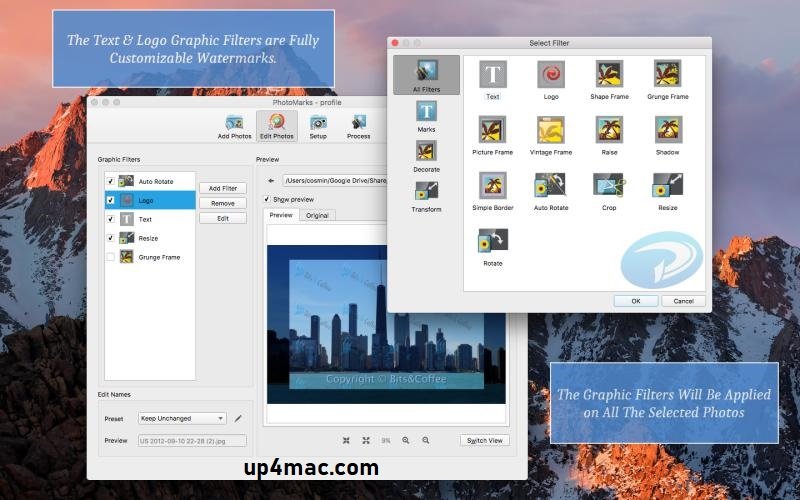
- PhotoMarks allows you to add customizable text and graphic logo watermarks to images. You can control the font style, size, color, opacity, rotation, and position to ensure the watermarks blend seamlessly with the image and remain visible.
Multiple Watermarks per Image
- Unlike many basic watermarking tools, PhotoMarks lets you add multiple watermarks to a single image. This feature is ideal for users who want to combine text, logos, and copyright notices for enhanced protection.
Invisible Digital Watermarks
- PhotoMarks includes support for invisible watermarks, which embed ownership data in images without altering their visual appearance. This is especially useful for copyright protection and digital rights management.
Custom Presets and Templates
- Users can create and save watermark presets for repeated use. These presets ensure consistency across projects and allow for the quick application of branding elements with minimal setup.
Flexible Image Resizing and Export Options
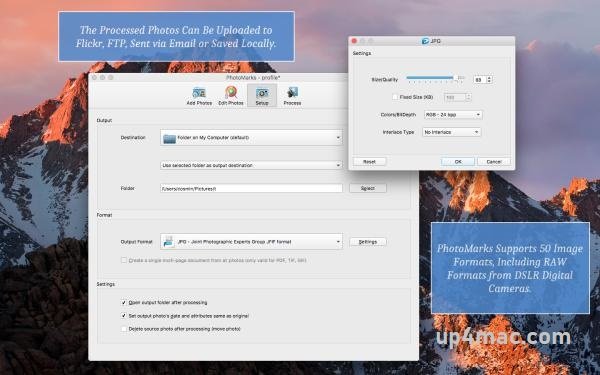
- In addition to watermarks, PhotoMarks offers image resizing tools and multiple export options. Users can adjust image dimensions, resolution, and file formats during export, making it easy to prepare images for the web, print, or social media.
Wide Format Compatibility
- PhotoMarks supports popular image formats such as JPEG, PNG, TIFF, and BMP. This broad compatibility ensures seamless integration with existing photography and design workflows.
Drag-and-Drop Interface
- The intuitive drag-and-drop interface makes PhotoMarks accessible to users of all experience levels. Images can be added quickly, and the watermark placement can be previewed in real time before processing.
You Can Also Download: Topaz Gigapixel 1.0.8 for Mac
Screenshots:
What’s New in PhotoMarks 4.1
Version 4.1 includes several updates that improve stability, performance, and the overall user experience.
Improved macOS Compatibility
- PhotoMarks 4.1 improves compatibility with the latest macOS versions, ensuring smooth performance and reliable operation on modern Apple hardware, including Apple Silicon systems.
Performance Improvements
- This update includes optimizations that improve batch processing speed and reduce resource usage, streamlining and optimizing large watermark creation tasks.
Stability and Bug Fixes
- Minor bugs identified in previous versions have been fixed. These fixes provide a more stable experience, especially during extended batch processing sessions.
Workflow Refinements
- Small improvements to the user interface and workflow make it easier to manage presets, preview results, and export images with consistent settings.
System Requirements for PhotoMarks 4.1
Before installing PhotoMarks 4.1 on your Mac, make sure your system meets the following requirements.
Minimum Requirements
- Operating System: macOS 10.14 or later
- Processor: Mac with an Intel or Apple Silicon processor
- RAM: 4 GB
- Storage Space: 300 MB of free disk space
- Display: 1280 × 800 resolution
Recommended Requirements
- Operating System: Latest version of macOS
- Processor: Apple Silicon (M1, M2, or later) or Intel Core i5 or better
- RAM: 8 GB or more
- Storage: SSD for faster processing
- Display: Retina display for accurate previews
Advantages and Disadvantages of PhotoMarks 4.1
Advantages
- Powerful batch watermarking capabilities
- Supports both visible and invisible watermarks
- Customizable text and logo options
- Preset settings for consistent branding
- Easy-to-use drag-and-drop interface
- Lightweight and optimized for macOS
- Ideal for both professional and casual users
Disadvantages
- Primarily focuses on watermarking, not comprehensive photo editing
- Limited creative editing tools compared to dedicated photo editors
- Paid software with limited trial features
- Not designed for complex image manipulation
Conclusion
PhotoMarks 4.1 for macOS is a reliable and professional solution for users who need to efficiently protect, customize, and manage their digital images. Its focus on batch watermarking, customization, and ease of use makes it an excellent choice for photographers, designers, businesses, and content creators.
Homepage: https://up4mac.com/
Leave a Reply