
Timemator 3.2.2 For MacOS Download

Timemator 3.2.2 for macOS is a smart, automated time tracking application designed specifically for Mac users. Unlike traditional time tracking apps that require manually starting and stopping the timer, Timemator automates your workflow with customizable rules that automatically detect and record activities.
This software helps users track their productivity, organize projects, generate reports, and analyze their work habits without interrupting their daily tasks. Whether you’re a freelancer billing clients by the hour, a remote worker tracking your productivity, or an entrepreneur managing your team’s performance, Timemator offers a simplified and efficient time management experience.
In this in-depth review, we’ll explore the features, latest updates, system requirements, pros, cons, and overall performance of Timemator 3.2.2 to help users understand why this application has become such a popular productivity tool on macOS.
Key Features of Timemator 3.2.2 for macOS:
Automatic Time Tracking
One of Timemator’s most notable features is its intelligent automatic time tracking system. Instead of manually starting timers, users can create rules based on applications, websites, or file activity.
For example:
- Using Adobe Photoshop can automatically trigger a timer for a “Design Project.”
- Opening Xcode can trigger time tracking for time spent coding.
- Visiting certain websites can trigger marketing or research tasks.
- This allows users to focus fully on their work without worrying about manually tracking their time.
Manual Time Tracking Option
While automation is Timemator’s primary strength, the application also supports manual timers for users who prefer traditional time tracking methods.
This flexibility makes the software suitable for various work styles and professional environments.
Smart Rules and Automation
Timemator allows users to create highly customizable automation rules. These rules can detect:
- Active applications
- Specific file names
- Visited websites
- System activity
Thanks to these automation features, time entries are more accurate and require minimal user intervention.
Project and Task Management
The software integrates powerful project management tools that allow users to:
- Create multiple projects
- Organize tasks
- Categorize recorded time
- Manage workflows more effectively
This feature is especially useful for freelancers and agencies managing multiple clients simultaneously.
Productivity Analytics and Reports
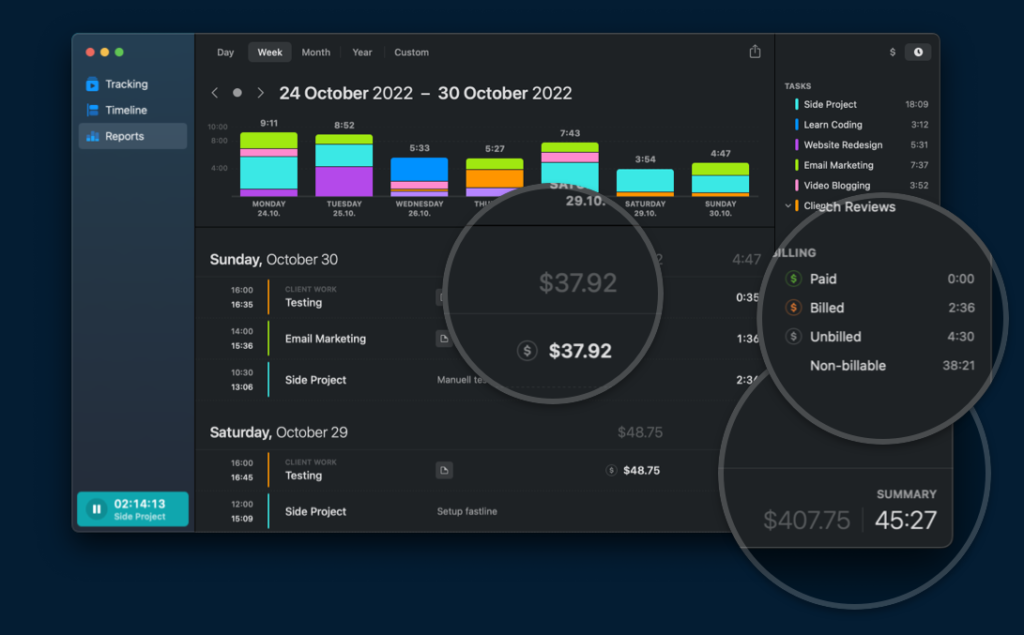
Timemator offers detailed reports and productivity statistics that allow you to analyze:
- Time spent on tasks
- Daily work habits
- Productivity trends
- Billable hours
The reporting dashboard provides valuable insights for improving time management and work efficiency.
What’s New in Timemator 3.2.2?
Performance Optimization
Version 3.2.2 offers performance improvements that optimize the application’s responsiveness and reduce resource consumption.
Users can expect:
- Faster startup
- Smoother timeline display
- Improved multitasking performance
This optimization makes the software more efficient for everyday business use.
Improved Rule Detection Accuracy
This latest version improves the recognition of automation rules, enabling more accurate activity tracking.
Users benefit from:
- Improved application detection
- Enhanced website monitoring
- More accurate project attribution
As a result, tracking data is more reliable and detailed.
Improved macOS Compatibility
Timemator 3.2.2 offers greater compatibility with recent versions of macOS and Apple Silicon devices.
This update ensures:
- Stable performance on Macs with M1 and M2 processors
- Improved system integration
- Longer battery life
The app now performs better on newer Apple computers.
You may also Download: Folx Pro 5.33 for MacOS
screenshots:
System Requirements
Minimum System Requirements
To use Timemator 3.2.2 effectively on macOS, the minimum system requirements are as follows:
- Operating System: macOS 10.13 High Sierra or later
- Processor: Intel for Mac processor
- RAM: 4 GB of RAM
- Disk Space: 200 MB of available space
- Display: 1280 × 800 resolution
Recommended Configuration
For optimal performance and smoother multitasking, the following configuration is recommended:
- Operating System: Latest version of macOS
- Processor: Intel Apple Silicon M1/M2 processor or later
- RAM: 8 GB of RAM or more
- Disk Space: SSD with at least 500 MB of free space
- Display: Retina display recommended
Meeting the recommended configuration ensures faster data processing and improved application responsiveness.
Advantages and Disadvantages of Timemator 3.2.2 for macOS
Advantages
Intelligent Automatic Tracking
The software minimizes manual tasks with intelligent automation rules.
Clean and Professional Interface
Timemator offers a clean, user-friendly, native macOS interface.
Detailed Productivity Reports
Users gain valuable insights into their work habits and project performance.
Offline Functionality
The application works without a constant internet connection.
Lightweight and Efficient
Timemator consumes minimal system resources by running in the background.
Guaranteed Privacy
Because the software runs locally, users maintain greater control over their data.
Disadvantages
- macOS Exclusive
- The software is only available for macOS users.
- Learning Curve for Automation Rules
- New users may need time to effectively configure advanced tracking rules.
- Limited team collaboration features
- Timemator focuses primarily on individual productivity, rather than managing large teams.
- Premium software
Some users may find the paid pricing structure less advantageous than free alternatives.
Conclusion
Timemator for macOS is a powerful and intelligent time-tracking application combines automation, productivity analytics, and project management into a single, intuitive platform. With automatic activity detection, detailed reporting tools, offline compatibility, and excellent optimization for macOS, Timemator 3.2.2 offers a highly effective productivity solution for freelancers, professionals, and remote workers.
Homepage: up4mac.com
Leave a Reply