
CotEditor 7.0.3 For MacOS Download
 CotEditor 7.0.3 for macOS is a free and open-source native text editor designed specifically for macOS. Known for its clean interface, excellent performance, syntax highlighting, Unicode support, and native Apple integration, CotEditor has become a go-to for developers and advanced users looking for a simple yet powerful editing environment.
Unlike bulky development suites, CotEditor prioritizes speed, ease of use, and macOS-native design principles. The application offers syntax highlighting for numerous programming languages, powerful search tools, scripting support, line-of-code operations, code management, and customization options, all in a compact form factor.
Whether you’re editing code, configuration files, Markdown documents, logs, scripts, or text files, CotEditor 7.0.3 offers a smooth and efficient editing experience for Mac users.
Key Features of CotEditor 7.0.3 For Windows:
Native macOS Design:
One of CotEditor’s main strengths is its fully native macOS interface.
The application is designed specifically for macOS and integrates seamlessly with:
- macOS appearance settings
- Dark Mode
- Apple Typography
- Native menus
- Keyboard shortcuts
- macOS file management
According to the official CotEditor website, the editor is developed entirely using native macOS technologies. CotEditor Official Website
This translates into a smooth, fast, and highly optimized editing experience.
Lightweight and Fast:
CotEditor is known for its exceptional speed and lightweight design.
The editor:
- Fast startup
- Minimal system resource usage
- Efficient handling of large text files
- Smooth scrolling
Unlike some modern Electron-based editors, CotEditor remains lightweight even on older Macs.
It is therefore ideal for users who prioritize speed and simplicity.
Syntax Highlighting Support:
CotEditor supports syntax highlighting for many programming and markup languages.
Supported Languages:
- HTML
- CSS
- JavaScript
- Python
- PHP
- Ruby
- Swift
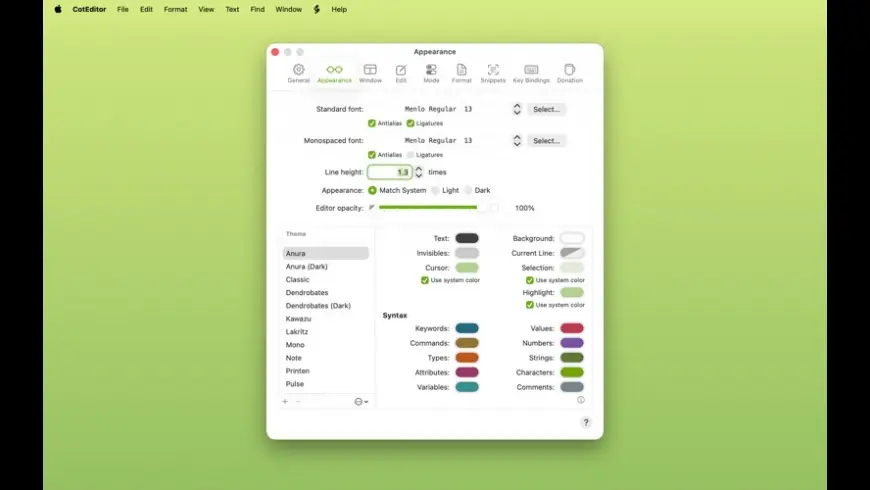
Users can also customize syntax definitions and create their own syntax highlighting rules.
This flexibility makes CotEditor useful for both developers and technical writers.
Powerful Search and Replace Tools:
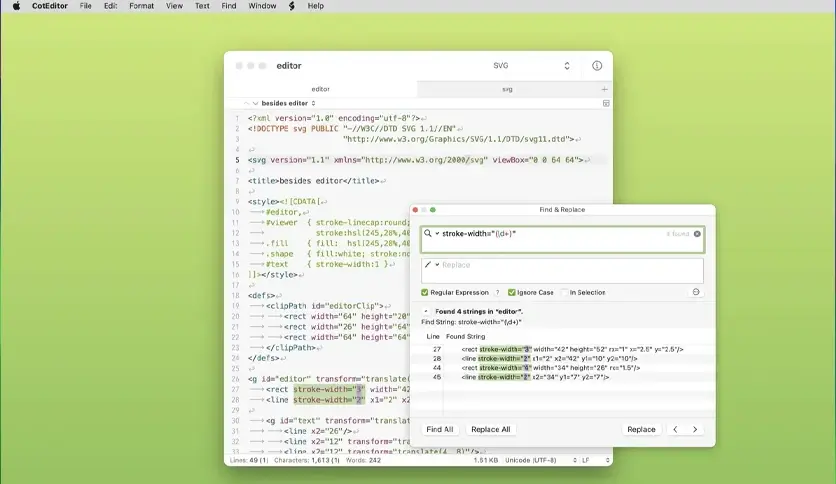
The application includes advanced text search features, such as:
- Regular expression support
- Incremental search
- Multi-file search
- Search and replace
- Line filtering
These tools simplify editing large documents and source code files.
Regular expression support is particularly useful for complex text manipulation workflows.
Unicode and Encoding Support:
CotEditor offers extensive support for the following encodings:
- Unicode Text
- UTF-8
- UTF-16
- Shift-JIS
- ISO encodings
- Various character sets
The editor can automatically detect text encoding and convert files between different formats.
This feature is especially valuable when working with multilingual documents or older files.
Row and Column Operations:
CotEditor includes several productivity-focused editing tools, such as:
- Row numbering
- Column selection
- Row duplication
- Sorting
- Enabling/disabling comments
- Indentation management
These features improve workflow efficiency when coding and editing text.
What’s New in CotEditor 7.0.3 For MacOS?
Improved macOS Compatibility:
Version 7.0.3 improves compatibility with recent macOS versions, including:
- macOS Sonoma
- Apple Silicon Systems
- Modern Finder Integration
The application continues to fully comply with Apple’s latest development standards.
Improved Stability and Performance:
This update includes several performance optimizations, including:
- Faster startup
- Improved memory management
- Improved file loading
- Reduced UI latency
These improvements help maintain CotEditor’s reputation for performance and lightweight design.
Enhanced Optimization for Apple Silicon:
Recent versions improve native compatibility with the following processors:
- M1 Processors
- M2 Processors
- M3 Processors
Optimization for Apple Silicon improves:
- Battery life
- Responsiveness
- Overall efficiency
This ensures excellent performance on modern Macs.
Updated Syntax Definitions:
Version 7.0.3 includes improvements to the syntax highlighting system:
- Updated language support
- Improved color management
- Improved syntax analysis
- New syntax styles
These improvements allow developers to work more efficiently with modern programming languages.
Bug Fixes and UI Improvements:
This latest version also fixes several issues related to:
- Search functionality
- Window management
- File encoding behavior
- Syntax rendering
These improvements optimize the editing experience.
Screenshots:
System Requirements:
Minimum System Requirements:
To use CotEditor 7.0.3 correctly on macOS, the minimum system requirements are as follows:
Operating System: macOS 14 Sonoma or later recommended
Processor: Intel Mac or Apple Silicon Mac
RAM: 4 GB minimum
Storage: Approximately 50 MB of available disk space
The official CotEditor website confirms compatibility with modern macOS systems. CotEditor Downloads
Recommended Configuration
For smoother multitasking and more efficient editing of large documents, the following configuration is recommended:
Operating System: macOS (latest version)
Processor: Apple Silicon M1, M2, or M3
RAM: 8 GB or more
Storage: SSD recommended
Meeting the recommended configuration improves responsiveness with large text files and when opening multiple tabs.
Advantages and Disadvantages of CotEditor 7.0.3 For MacOS:
Advantages:
- Lightweight and fast
- The editor works optimally, even on older Macs.
- Native macOS integration
- The interface integrates seamlessly with macOS.
- Free and open-source software
- No subscription or license fee required.
- Excellent encoding support
- Highly reliable support for Unicode and legacy encodings.
- Powerful syntax highlighting
- Useful for developers and technical users.
- Optimized for Apple Silicon
- Native support improves performance on newer Macs.
- Clean and minimalist interface
- The editor remains simple and distraction-free.
Disadvantages:
- Limited IDE features
- CotEditor is not a complete development environment.
- Fewer extensions than VS Code
- Customization options are more limited than in leading IDEs.
- Basic collaboration features
- The software lacks built-in cloud collaboration tools.
- It’s not designed for large enterprise projects.
- Advanced debugging and enterprise workflow management features are limited.
Conclusion:
CotEditor Version 7.0.3 for macOS is a lightweight, fast, and powerful native text editor designed specifically for Mac users. With syntax highlighting, Unicode support, powerful search tools, optimization for Apple Silicon, scripting support, and a clean, native macOS interface, CotEditor offers an excellent balance between simplicity and functionality.
Homepage: up4mac.com
Leave a Reply