
VidHub 2.1.8 For MacOS Download

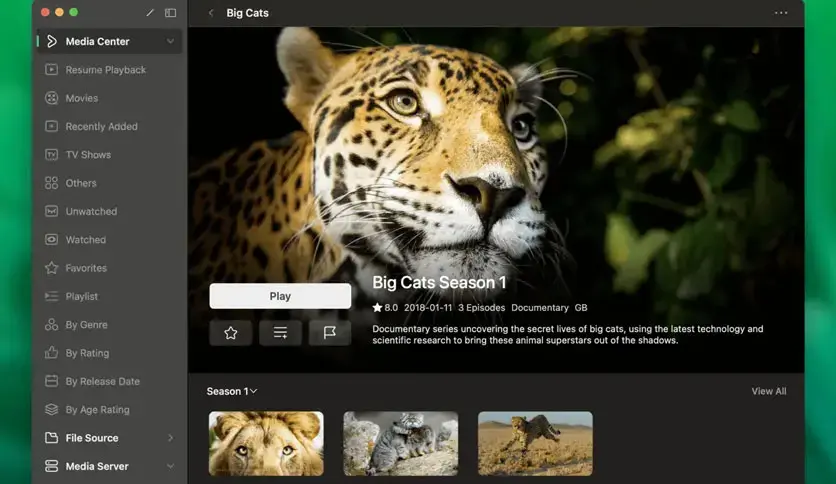
VidHub 2.1.8 for macOS is a modern media library manager and video player designed to deliver a clean, organized, and visually appealing home theater experience on Mac systems. This software combines advanced playback technology with intelligent media library management, allowing users to transform their scattered video files into a seamless, streaming-like interface.
VidHub focuses on:
- Video playback
- Network streaming
- NAS support
Unlike many traditional desktop media players, VidHub prioritizes visual organization and immersive navigation, similar to that of premium streaming platforms. Whether you’re a film buff, a TV series collector, a NAS user, a Plex/Emby user, or simply a multimedia consumer, VidHub 2.1.8 offers a flexible and modern media management solution for macOS.
Key Features of VidHub 2.1.8 For MacOS:
Intelligent Media Library Management
One of VidHub’s main strengths is its intelligent media organization system.
The software automatically analyzes and organizes video collections, retrieving metadata such as:
- Movie titles
- Posters
- Episode names
- Cast
This results in a visually appealing interface, similar to that of professional media centers.
Users with large collections of movies or TV series benefit greatly from this automated workflow.
Extensive Video Format Compatibility
VidHub supports playback of virtually all major video formats without the need for external codecs.
Supported Formats:
- MP4
- MKV
- MOV
- AVI
- WMV
- RMVB
The software is designed to smoothly play both standard definition and high-definition content.
This broad compatibility eliminates the need for manual file conversion.
High-Quality Playback Engine
VidHub integrates an optimized playback engine capable of handling:
- Full HD Playback
- 4K Video
- HDR Content
- Hardware Acceleration
Adjustable Playback Speed
Playback Features:
- Subtitle Sync
- Screen Capture
- Audio Track Switching
- Video Adjustment Controls
The software ensures smooth playback and minimizes CPU usage thanks to hardware decoding.
Network Streaming Compatibility
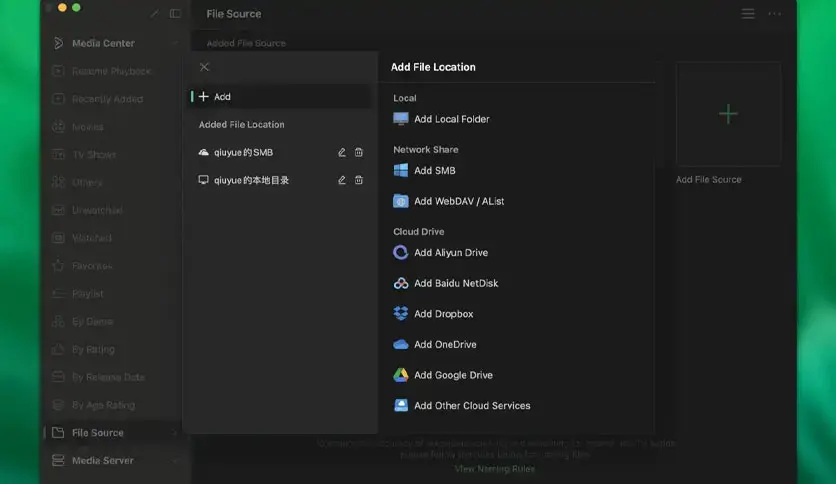
VidHub supports streaming from multiple network sources.
Supported Protocols:
- SMB (Samba)
- WebDAV
- FTP
Official descriptions confirm compatibility with Google Drive, Dropbox, OneDrive, and network storage solutions.
Therefore, VidHub is ideal for users who manage centralized media libraries.
Automatic Metadata Retrieval
VidHub automatically downloads media information for movies and TV series.
Metadata includes:
- Posters
- Cover Art
- Episode Information
- Cast Information
- Ratings
- Descriptions
This significantly improves navigation and organization of large media collections.
The software transforms ordinary file folders into a visually appealing media library.
Advanced Subtitle Support
Subtitle management is one of VidHub’s most important features.
The software supports:
- External subtitle files
- Embedded subtitles
- Online subtitle search
- Subtitle synchronization
- Font customization
- Position adjustments
What’s New in VidHub 2.1.8?
Improved macOS Compatibility
The latest updates have resolved some user interface compatibility issues with recent versions of macOS.
These changes improve:
- Window rendering
- Interface responsiveness
- Stability on modern macOS systems
Playback stability
The latest updates have also improved:
- Hardware decoding
- Playback reliability
- Streaming performance
- Crackling prevention
Users with high-resolution video libraries will experience smoother playback.
Enhanced Media Server Features
Updates currently in development include:
- Faster path selection
- Improved media server management
- Privacy mode support
- Cloud sync controls
- Improved rating systems
These changes streamline large-scale media management workflows.
Enhanced Search Experience
The latest UI improvements include:
- Search history
- Recommended content
- Additional search commands
- Improved visual organization
These enhancements significantly improve the user experience.
Stability and Bug Fixes
Version 2.1.8 also fixes:
- UI interaction issues
- Subtitle display errors
- Connection reliability issues
- Cloud playback problems
- These updates improve overall stability.
You can also Download: Path Finder 26.1.1 for MacOS
Screenshos:
System Requirements:
Minimum System Requirements
To use VidHub 2.1.8 optimally on macOS, users must meet the following minimum system requirements:
- Operating System: macOS 10.15 Catalina or later
- Processor: Intel for Mac or Apple Silicon processor
- RAM: 4 GB minimum
- Storage: Approximately 200 MB of available disk space
- Graphics: Hardware acceleration is recommended
Official compatibility information confirms compatibility with macOS 10.15 and later.
System Requirements
For smoother 4K playback and a large media library, the following configuration is recommended:
- Operating System: macOS Ventura or later
- Processor: Apple M1, M2, M3, or later
- RAM: 8 GB or more
- Storage: SSD recommended
- Network: Broadband LAN for streaming from a NAS
Advantages and Disadvantages of VidHub 2.1.8
Advantages:
- Attractive interface for the media library
- Elegant design for optimal navigation
- Excellent format compatibility
- Supports virtually all major video formats
- Extensive NAS and network compatibility
- Advanced features for Subtitles
- Sync with the Apple ecosystem
Diadvantages:
- Occasional subtitle search issues
- Smaller ecosystem than major media platforms
- Less active community than Plex or Infuse.
- Recent updates have fixed several cloud playback bugs.
Conclusion:
VidHub 2.1.8 for macOS is a modern and powerful media library manager and video player designed for users seeking a visually organized and feature-rich multimedia experience. With support for intelligent media organization, automatic metadata extraction, NAS streaming, subtitle management, iCloud syncing, high-quality playback, and optimization for Apple Silicon processors, VidHub stands out as one of the most promising media center applications for Mac users.
Leave a Reply