
A Better Finder Rename 12.24 for MacOS Download

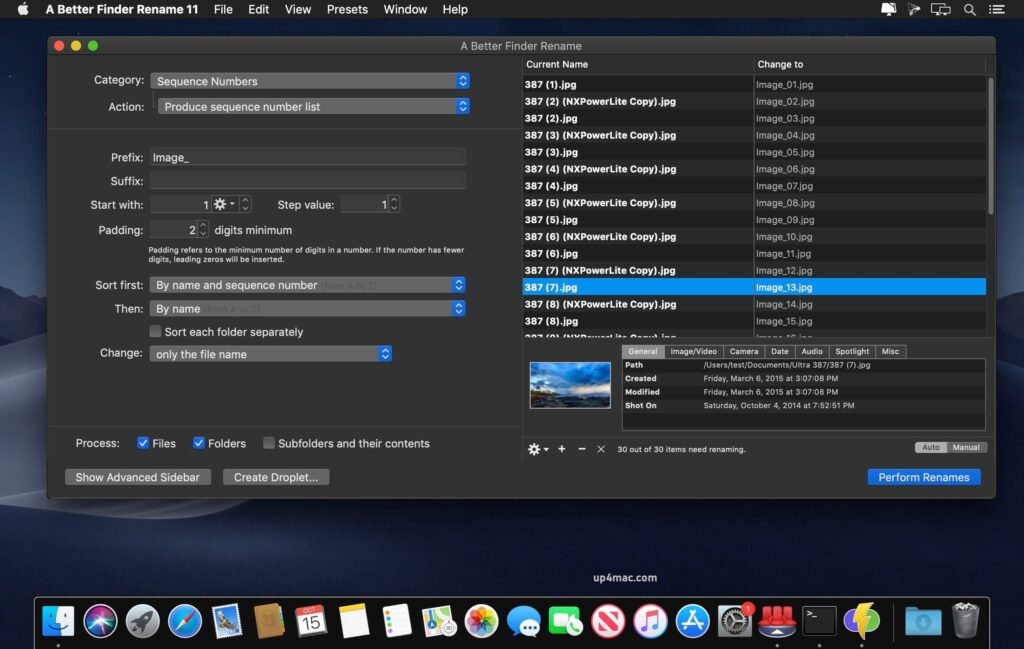
A Better Finder Rename 12.24 for MacOS is the most comprehensive renaming solution available. That’s why, since 1996, tens of thousands of hobbyists, professionals, and businesses have relied on A Better Finder Rename to organize and maintain their files. The Instant Preview feature eliminates guesswork and costly mistakes, helping you quickly and accurately find the right settings with real-time feedback.
A Better Finder Rename offers a complete set of renaming options, organized into 15 categories that cover all the text, character, position, conversion, and truncation functions you would expect from a file renamer—but it doesn’t stop there. The multi-step renaming feature lets you combine multiple steps to handle complex tasks in a single operation. Unlike other tools, A Better Finder Rename allows you to combine, reorder, copy, and delete any number of renaming actions.
Key Features of A Better Finder Rename for macOS 12.24
A Better Finder Rename offers a comprehensive feature set that makes it one of the most advanced batch renaming tools for macOS. Below are the key features that set it apart from standard file renaming utilities.
1. Powerful Batch Renaming Functionality
One of the most impressive features of A Better Finder Rename is its ability to rename thousands of files in seconds. Users can apply multiple renaming actions simultaneously, saving significant time and effort. Whether you need to rename a few documents or an entire folder structure, the software handles it with ease.
2. Real-Time Preview
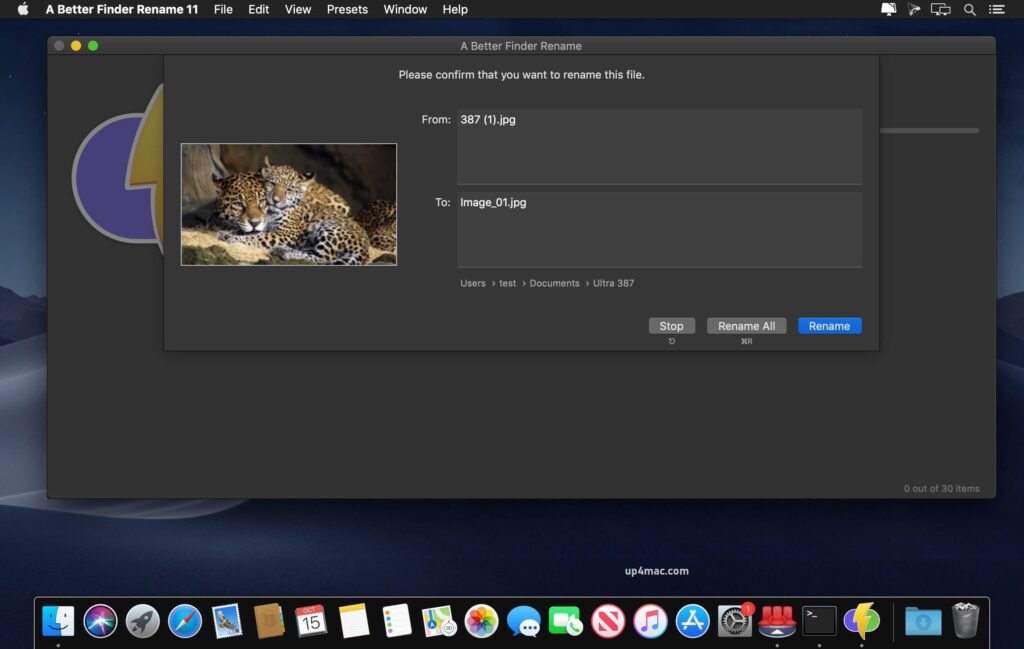
- Before applying any changes, the software provides a real-time preview of how the renamed files will look. This ensures complete accuracy and minimizes the risk of errors. Users can fine-tune the settings until they achieve the desired result, making the process safe and efficient.
3. Multiple Renaming Methods
A Better Finder Rename supports a wide range of renaming methods, including:
- Text replacement
- Adding prefixes and suffixes
- Sequential numbering
- Inserting date and time
- Metadata-based renaming
- Regular expression support
This flexibility allows users to handle both simple and complex renaming tasks with ease.
4. Drag-and-Drop Interface
- The intuitive drag-and-drop interface makes it easy to add files or folders to the program. Users can quickly create renaming workflows without any technical expertise, ensuring a smooth and intuitive experience.
5. Preset Management
- Users can save frequently used renaming configurations as presets. This feature is especially beneficial for professionals who perform similar tasks regularly. Presets allow for the instant application of complex renaming rules, improving productivity and consistency.
6. Advanced Automation
- A Better Finder Rename integrates seamlessly with macOS automation tools, allowing users to automate repetitive renaming tasks. This is ideal for power users who require streamlined workflows and maximum efficiency.
7. Compatibility with Finder and Other Applications
- The software integrates directly with Finder, allowing users to rename files directly from within their file manager. It also works seamlessly with popular third-party applications, increasing its versatility.
What’s New in A Better Finder Rename 12.24
The latest version, 12.24, includes several improvements and adjustments to optimize performance, compatibility, and user experience. Here are the most notable updates:
1. Improved macOS Compatibility
- Version 12.24 offers improved compatibility with the latest macOS versions, ensuring smooth performance on modern Mac hardware, including Apple Silicon devices. This update guarantees faster processing and greater system stability.
2. Performance Optimization
- Significant performance improvements have been introduced to handle larger batches of files more efficiently. Users can now rename tens of thousands of files without experiencing slowdowns or system delays.
3. User Interface Improvements
- Small design improvements and layout adjustments make the interface more intuitive and visually appealing. These changes improve workflow efficiency, especially for new users.
4. Bug Fixes and Stability Improvements
- Several bugs reported in previous versions have been fixed. This update improves overall stability, reducing the likelihood of crashes and unexpected behavior.
5. Metadata Management Improvements
- Improved metadata reading and processing ensure more accurate renaming when working with images, videos, and audio files. This is especially beneficial for photographers and media professionals.
you can also download: Apple Creator Studio 2026.01 for Mac
Screenshots:
System Requirements:
- Operating System: macOS 10.12 or later
- Processor: Mac with Intel or Apple Silicon
- RAM: 2 GB
- Disk Space: 100 MB of free storage
- Display: 1024 x 768 resolution
Use Cases and Practical Applications
A Better Finder Rename is ideal for a wide range of users and professional scenarios. Some common use cases include:
- Photographers: Rename thousands of image files based on metadata, date, or location.
- Video Editors: Systematically organize video clips for efficient editing workflows.
- Developers: Quickly rename project files and directories in batches.
- Office Professionals: Manage documents, reports, and spreadsheets with consistent naming conventions.
- Students: Effortlessly organize files and academic assignments.
Conclusion
A Better Finder Rename for macOS 12.24 is undoubtedly one of the most advanced and reliable batch file renaming utilities available for Mac users. With its powerful feature set, intuitive interface, high-speed performance, and seamless system integration, it offers exceptional value for both casual and professional users.
Homepage: https://up4mac.com/
Leave a Reply