
Apple Compressor 4.11.1 for MacOS Download

Apple Compressor 4.11.1 for MacOS is a powerful companion application to Final Cut Pro, enabling users to convert, encode, and optimize video and audio files for a wide range of formats and platforms. Whether you are preparing content for Apple devices, streaming services, broadcast television, or web distribution, Compressor provides advanced control over encoding settings while maintaining exceptional output quality.
Version 4.11.1 continues Apple’s focus on performance, stability, and compatibility with the latest macOS releases and Apple Silicon hardware. With enhanced efficiency, improved format support, and deeper integration with the Apple ecosystem, Apple Compressor remains a preferred choice for professional editors, studios, and content creators across the United States. you can also download: Final Cut Pro for MacOS
Key Features of Apple Compressor 4.11.1
Apple Compressor 4.11.1 includes a robust set of features that make it one of the most reliable and flexible media encoding tools available for macOS.
Advanced Media Encoding and Compression
- At its core, Apple Compressor offers precise control over video and audio compression. Users can encode media into a wide range of formats, including HEVC, H.264, ProRes, MXF, and MPEG-4. This flexibility ensures compatibility with modern streaming platforms, broadcast standards, and archival requirements.
Custom Encoding Presets
- Users can create, save, and reuse custom presets tailored to specific delivery requirements. This feature is particularly useful for professionals who regularly export content for consistent platforms such as YouTube, Apple TV, broadcast networks, or internal review systems.
Batch Processing for Efficiency
- Apple Compressor supports batch encoding, enabling users to process multiple files simultaneously. This significantly reduces production time, especially when handling large projects or high volumes of media.
Distributed Encoding Support
- One of the standout features of Compressor is distributed encoding, which allows multiple Mac computers on the same network to share encoding tasks. This capability dramatically increases processing speed and is ideal for studios and production environments.
High-Quality ProRes Support
- Apple Compressor provides full support for Apple ProRes formats, including ProRes RAW. This ensures minimal quality loss during encoding and is essential for professional workflows requiring high-fidelity video output.
Advanced Audio Encoding Tools
- In addition to video compression, Compressor includes powerful audio encoding features. Users can fine-tune audio channels, bitrates, sample rates, and surround sound settings to meet professional audio standards.
Metadata and Caption Support
- Compressor allows users to embed metadata, subtitles, and closed captions into video files. This feature is especially valuable for broadcast compliance, accessibility standards, and professional content delivery in the United States market.
What’s New in Apple Compressor 4.11.1
Version 4.11.1 introduces several refinements aimed at improving performance, stability, and compatibility with modern Apple hardware and software.
Improved Apple Silicon Optimization
- This update further enhances performance on Apple Silicon Macs, delivering faster encoding speeds and more efficient power usage. Users benefit from smoother workflows, especially when working with high-resolution and HDR content.
Enhanced macOS Compatibility
- Apple Compressor 4.11.1 improves compatibility with the latest macOS versions, ensuring stable performance and seamless integration with system-level features.
Stability and Bug Fixes
- Minor bugs and encoding-related issues reported in earlier releases have been addressed. These fixes result in more reliable batch processing and fewer interruptions during long encoding sessions.
Workflow Refinements
- The latest update includes small but meaningful workflow improvements that enhance usability, making it easier to manage encoding tasks, presets, and output destinations.
You Can Also Download: Topaz Gigapixel 1.0.8 for MacOS
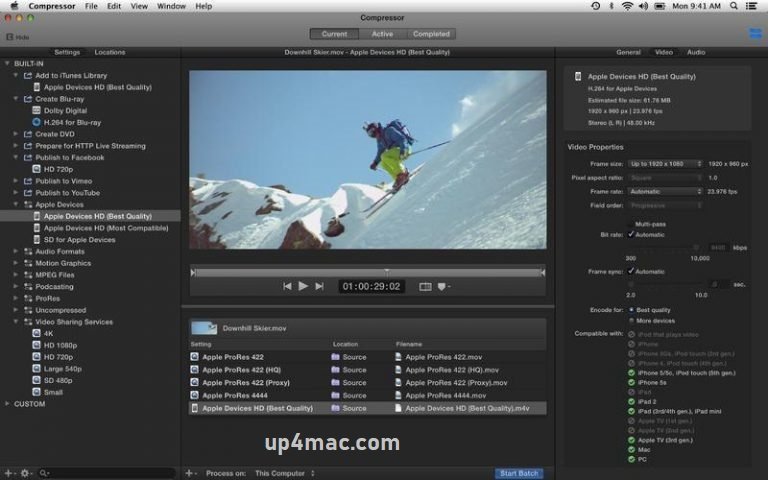
Screenshots:

System Requirements for Apple Compressor 4.11.1
Before installing Apple Compressor 4.11.1 on macOS, ensure your system meets the following requirements.
Minimum Requirements
- Operating System: macOS 13 or later
- Processor: Intel-based Mac or Apple Silicon
- RAM: 4 GB
- Storage Space: 2 GB of free disk space
- Graphics: Metal-capable graphics card
Recommended Requirements
- Operating System: Latest version of macOS
- Processor: Apple Silicon (M1 Pro, M2, or newer)
- RAM: 8 GB or more
- Storage: SSD with sufficient free space for large media files
- Network: Gigabit Ethernet for distributed encoding
You Can Also Download: Folder Colorizer 4
Pros and Cons of Apple Compressor 4.11.1
Pros
- Professional-grade encoding and compression tools
- Seamless integration with Final Cut Pro
- Excellent support for ProRes and HEVC formats
- Batch and distributed encoding capabilities
- Optimized for Apple Silicon performance
- Reliable and stable for long encoding tasks
- Designed for broadcast and professional delivery standards
Cons
- macOS-exclusive software
- Requires Final Cut Pro for full workflow integration
- Learning curve for beginners unfamiliar with encoding concepts
- Not designed for basic or casual video editing
Conclusion:
Apple Compressor 4.11.1 for macOS remains a powerful and dependable media encoding solution for professional users, particularly those in the United States who work in video production, broadcasting, and post-production environments. With its advanced compression tools, seamless Final Cut Pro integration, and optimized performance on modern Apple hardware, Compressor continues to meet the demands of high-quality media delivery.
The latest updates in version 4.11.1 enhance stability, performance, and compatibility, ensuring a smooth experience for professionals handling complex encoding tasks. While it may not be intended for casual users, Apple Compressor excels in professional workflows where precision, reliability, and efficiency are critical.
For editors, studios, and content creators seeking a robust and industry-standard encoding tool on macOS, Apple Compressor 4.11.1 remains an excellent and future-ready choice.
Homepage: https://up4mac.com/
Leave a Reply