
Dropshare 6.10.0 for MacOS Download
Dropshare 6.10.0 for MacOS is a powerful and elegant solution designed specifically for Mac users who want to share files quickly, securely, and in a customizable way. Dropshare 6 is a menulet that lets you easily drag and drop files, folders, and anything else to your own server, Amazon S3, Rackspace Cloud Files, or Google Drive. Once uploaded, the application copies the link to your Mac’s clipboard, and you’re ready to share it with anyone!
Dropshare Mac supports SCP over SSH, an industry-standard, secure protocol for file transfer. It also supports uploads to Amazon Simple Storage Service (S3) or Rackspace Cloud Files, both affordable cloud file hosting services. Unlike other cloud-hosted file-sharing services, Dropshare connects directly to your Amazon S3 bucket or Rackspace Cloud Files container, without requiring any third parties. Dropshare supports multiple connections: you can configure different upload destinations simultaneously and switch between them using custom keyboard shortcuts.
Dropshare Download is a professional file-sharing and screenshot tool that lets you upload files, images, videos, and screen recordings directly to its servers or popular cloud services. Unlike traditional cloud storage tools, Dropshare gives users complete control over their data, hosting options, and sharing methods. As a result, it stands out as a premium solution for individuals and teams seeking efficiency, privacy, and flexibility.
Key Features of Dropshare 6.10.0 for MacOS
Dropshare offers a wide range of features that facilitate file sharing, screenshots, and workflow automation. Below are some of the key features that contribute to its popularity among Mac users.
1. Fast and Secure File Uploads
- Dropshare allows for instant uploads of files, folders, screenshots, and screen recordings. Users can upload content to their own servers, including FTP, SFTP, SCP, Amazon S3, Google Cloud Storage, Microsoft Azure, and many other cloud-based platforms. This flexibility ensures data security and full ownership of uploaded content.
2. Advanced Screen Capture and Recording Tools
- One of Dropshare’s most prominent features is its built-in screen capture and recording functionality. Users can easily capture entire screens, specific windows, or selected areas. Screen recording is equally smooth, making it ideal for creating tutorials, presentations, and demos.
3. Automatic Link Generation and Sharing
- Once a file is uploaded, Dropshare automatically generates a shareable link. These links can be instantly copied to the clipboard, shared via email, or posted to messaging platforms. This feature saves time and simplifies collaboration.
4. Custom Hosting and Branding
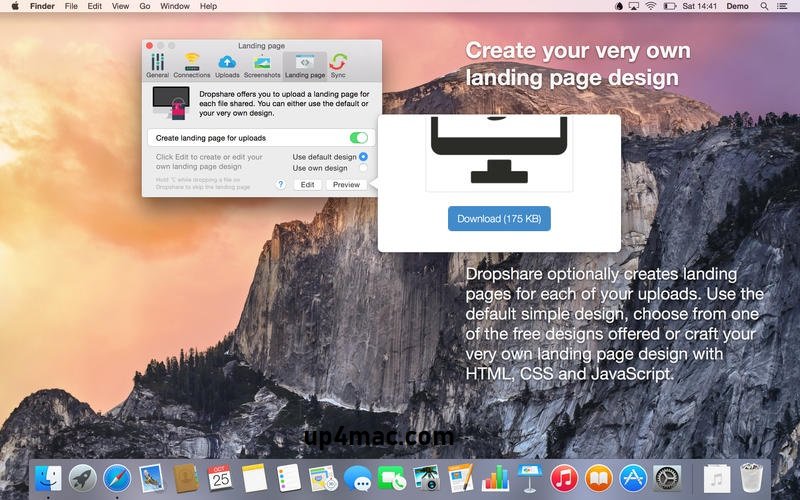
- Dropshare allows users to fully customize their upload destinations, domains, and visual branding. Businesses and professionals can create branded download pages that reflect their identity, offering a more professional user experience.
5. Menu Bar Integration
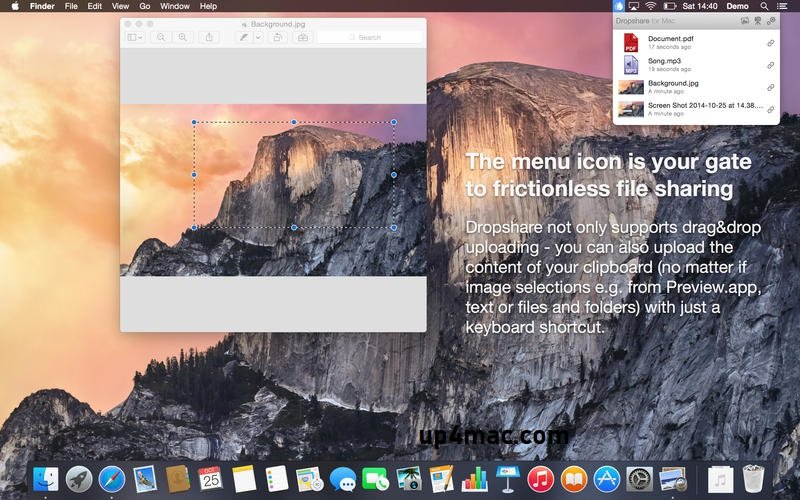
- The application runs silently in the macOS menu bar, ensuring easy access without cluttering the desktop. With simple drag-and-drop functionality, users can upload files directly to Dropshare from anywhere on their system.
6. Clipboard and Drag-and-Drop Uploads
- Dropshare supports clipboard uploads, allowing users to instantly upload copied images, text, or files. Furthermore, the drag-and-drop functionality ensures seamless integration into your workflow.
7. Encryption and Secure Transfers
- Security is a top priority at Dropshare. The software supports encrypted transfers and secure authentication protocols, ensuring file protection during upload and sharing.
8. Workflow Automation
- Dropshare integrates with macOS automation tools, allowing users to create custom workflows. This is especially useful for professionals who need streamlined processes for repetitive tasks.
What’s New in Dropshare 6.10.0 – Latest Updates
Version 6.10.0 introduces performance improvements, greater compatibility, and several usability enhancements. These updates aim to provide a smoother, faster, and more stable user experience.
1. Improved macOS Compatibility
- Dropshare 6.10.0 is fully optimized for the latest macOS versions and is compatible with Intel and Apple Silicon processors. This ensures faster processing, greater system stability, and lower resource consumption.
2. Improved Performance and Speed
- Significant performance improvements reduce loading times, especially for large files and high-resolution video recordings. Users can now enjoy faster transfers and smoother workflows.
3. Updated User Interface
- The interface has received subtle improvements, making it more intuitive and visually appealing. Navigation is smoother, and frequently used options are easier to access.
4. Bug Fixes and Stability Improvements
- Several bugs reported in previous versions have been fixed, improving reliability and reducing the crash rate. These fixes contribute to a more stable and consistent experience.
5. Enhanced Cloud Service Compatibility
- Additional cloud service support and updated APIs ensure better integration with modern storage platforms, offering users even greater flexibility.
you can also download: Final Cut Pro 12.0 for Mac
Screenshots:
System Requirements:
- Operating System: macOS 10.13 or later
- Processor: Mac with Intel or Apple Silicon
- RAM: 2 GB
- Storage Space: 150 MB of free disk space
- Internet Connection: Required for uploading files
Practical Use Cases for Dropshare
Dropshare is ideal for a wide range of users and professional applications. Some common use cases include:
- Content Creators: Instantly upload and share large video files, images, and tutorials.
- Developers: Efficiently share builds, logs, and screenshots.
- Designers: Quickly send high-resolution graphics and mockups.
- Remote Teams: Collaborate effectively by sharing files and screen recordings.
- Professionals: Securely create presentations, reports, and documents.
Conclusion
Dropshare 6.10.0 for MacOS is a premium file-sharing and screen-capturing solution that offers exceptional performance, security, and flexibility. Its powerful upload system, advanced screen capture and recording tools, and seamless integration with macOS make it the ideal choice for both professionals and everyday users.
Homepage: https://up4mac.com/
Leave a Reply