
File Cabinet Pro 8.7.4 for MacOS Download
 File Cabinet Pro 8 for Mac is designed to meet this need, offering a comprehensive document management system that simplifies storage, organization, and retrieval.
File Cabinet Pro provides a centralized digital filing system where users can securely store, categorize, and manage files of all types. It supports advanced tagging, OCR-based text recognition, powerful search capabilities, and seamless document organization. Whether you’re a professional, student, legal practitioner, or everyday Mac user, File Cabinet Pro helps you transform cluttered digital spaces into well-organized, searchable files.
File Cabinet Pro for macOS 8.7.4 in depth. The article covers its key features, latest updates, system requirements, advantages, disadvantages, and overall usability, helping you decide if it’s the right document management solution for your Mac.
you can also download: MacCleaner Pro 4.0.2 for Mac
Key Features of File Cabinet Pro 8 for Mac
File Cabinet Pro boasts a wide range of features designed to streamline document management, boost productivity, and ensure data security. Its most important features are detailed below.
Centralized Document Storage
- Essentially, File Cabinet Pro functions as a digital filing cabinet. Users can store all their important files, including PDFs, images, Word documents, spreadsheets, and more, in a single, organized environment. This centralization simplifies document management and reduces the risk of losing important files.
Advanced Folder and Category Organization
- The software allows you to create custom folders, categories, and subcategories. Documents can be sorted by project, date, client, or any preferred system. This flexibility ensures that files remain structured and easy to locate.
OCR Text Recognition
- One of File Cabinet Pro’s standout features is its integrated Optical Character Recognition (OCR) technology. OCR converts scanned documents and images into searchable text, allowing users to find specific content within files. This is especially useful for digitized documents, receipts, and archived files.
Powerful Search Function
- File Cabinet Pro includes advanced search tools that allow users to quickly locate files using keywords, tags, metadata, and OCR text. Its fast and accurate search significantly reduces the time spent manually browsing folders.
Secure File Management
- Security is a key aspect of File Cabinet Pro. The software includes password protection, file encryption, and secure access controls to protect confidential information. This makes it ideal for professionals managing sensitive documents.
Tag and Metadata Support
- Users can assign custom tags and metadata to documents, improving organization and retrieval. Tag-based categorization adds an extra layer of flexibility, allowing access to files through multiple sorting methods.
Seamless macOS Integration
- Designed specifically for macOS, File Cabinet Pro integrates seamlessly with Finder, Spotlight, and other system features. This ensures a familiar workflow and increased productivity across the entire Mac ecosystem.
you can also download: Krita Studio 5.2.15 for Mac
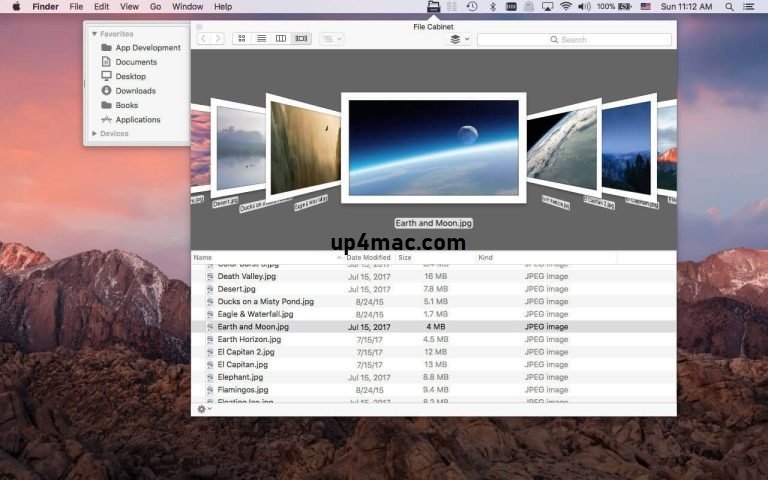
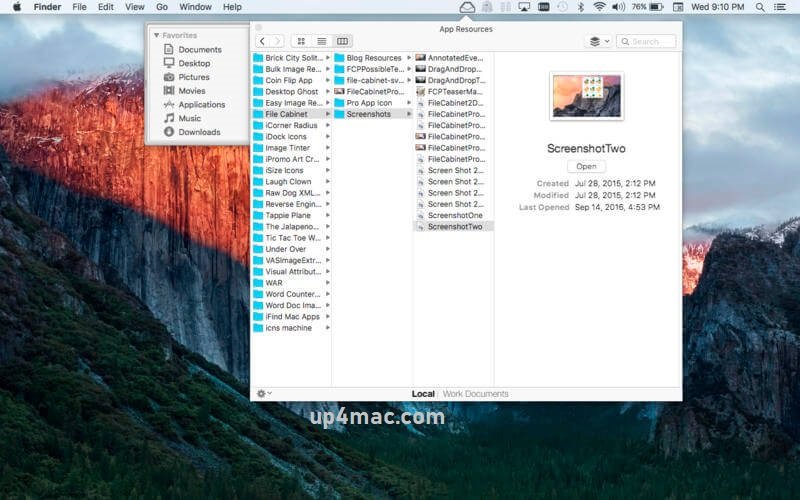
Screenshots:
What’s New in Version 8.7.4
- You can now enable the “View Extended Attributes” action from the toolbar. To do this, simply add the “xattr” button to the toolbar in the Customization palette.
- The icon image for the “Show in Finder” button in the toolbar is now slightly larger (macOS 26.0 and later).
- Some minor bugs have been fixed in macOS 26.0.
Technical Specifications and System Requirements:
- OS X 10.11 or later
- Apple Silicon or Intel Core processor
Pros and Cons of File Cabinet Pro for macOS 8.7.4
Evaluating both advantages and limitations helps users decide whether File Cabinet Pro suits their needs.
Pros
- Comprehensive document management solution
- Powerful OCR and search functionality
- Secure file storage with encryption options
- Advanced organization through folders and tags
- Smooth macOS integration
- Suitable for personal and professional use
Cons
- Learning curve for new users
- Resource usage may increase with large document libraries
- Premium pricing compared to basic file managers
Conclusion
File Cabinet Pro 8 for Mac is a feature-rich and dependable document management solution that brings structure, security, and efficiency to digital file organization. Its combination of centralized storage, advanced OCR, powerful search tools, and robust security features makes it an excellent choice for professionals, businesses, and individuals alike.
Homepage: https://up4mac.com/
Leave a Reply