
Find Any File (FAF) 2.6.1 for MacOS Download

Find Any File (FAF) 2.6.1 for MacOS doesn’t have submenus with configuration options and is quick and easy to use. Simply enter a keyword (or several) in the search box; no menu settings are needed.
However, if you need a more complex search, Find Any File has numerous submenus that simplify the process.
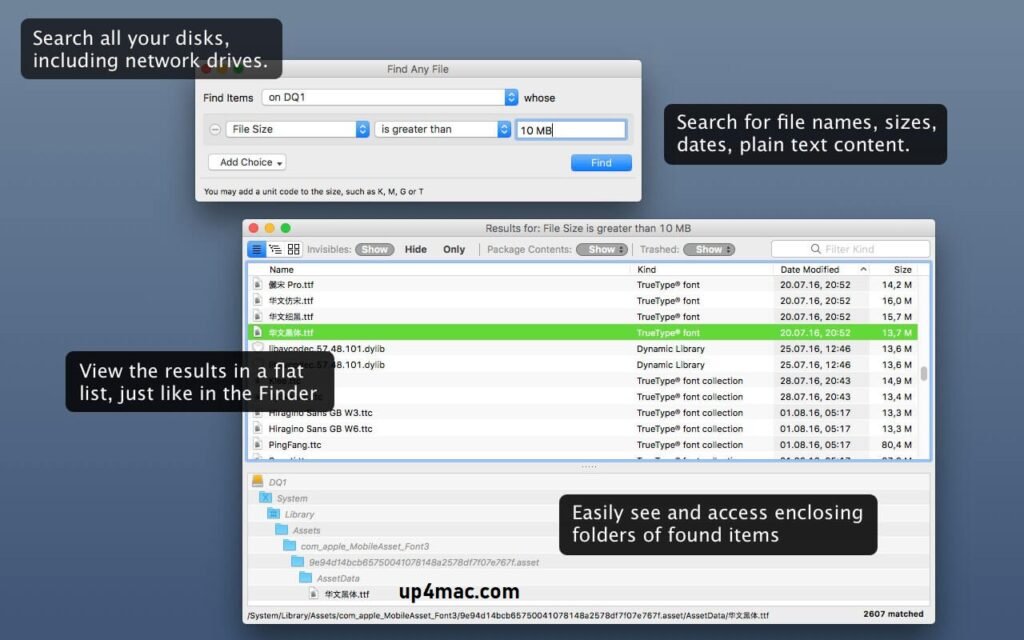
Unlike Spotlight, Find Any File doesn’t use an indexed database. Instead, it uses the file system handle to perform searches (when possible). This allows you to search for files by name, creation date, size, and more, in addition to the file’s contents.
Find Any File (FAF) 2.6.1 can find files that Spotlight misses, such as files within packages, folders, and sets. Searches typically take a few seconds. Find Any File also offers several unique features, such as a hierarchical view of found files, which can be accessed by pressing Command-2 or by right-clicking the icon at the top of the search results window. This view allows you to see search results in specific folders.
If you press the Option (alt) key when starting Search, you will be prompted for an administrator password, and then the program will restart with access to the root directory, allowing you to find virtually any file on your Mac.
Key Features of Find Any File (FAF) 2.6.1 for MacOS
Find Any File offers a comprehensive set of features that streamline, optimize, and make file searching more flexible. Below are the key features that define its performance.
1. Advanced File Search Technology
- One of FAF’s most powerful aspects is its ability to perform thorough system searches. Unlike Spotlight, which relies on indexing, FAF directly scans the file system. This allows users to find hidden, unindexed, or overlooked files.
As a result, users can locate files that traditional tools might miss.
2. Highly Customizable Search Filters
FAF allows users to filter search results using multiple criteria, such as:
- File name and partial match
- File type and extension
- File size range
- Creation and modification dates
- File content
- File ownership and permissions
This level of customization ensures users can find exactly what they are looking for, saving time and improving productivity.
3. Content-Based Search
- In addition to file name searches, FAF supports content-based search. This means users can locate documents, text files, and scripts by searching for words or phrases within the files themselves. This feature is therefore extremely useful for writers, developers, researchers, and office professionals.
4. Regular Expression Support
- For advanced users, Find Any File offers regular expression support. This allows for complex pattern-based searches, making it ideal for developers and IT professionals who require precise control over search queries.
5. Searching Network Drives and External Storage
- FAF can scan not only local storage, but also network drives, external hard drives, USB devices, and mounted volumes. This makes it a highly versatile tool for users working with multiple storage locations.
6. Fast and Accurate Results
- Thanks to its optimized scanning engine, FAF delivers fast and reliable search results, even when working with large directories or multiple drives. Therefore, users can quickly locate critical files without long wait times.
7. Simple and Clear User Interface
- Despite its powerful functionality, FAF maintains a clear and intuitive interface. Users can easily configure search parameters, view results, and perform actions such as opening, copying, or moving files directly from the results window.
8. Integration with Finder and System Tools
- Find Any File integrates seamlessly with Finder, allowing users to instantly view files and perform additional file management tasks without switching applications.
What’s New in Find Any File (FAF) 2.6.1
Version 2.6.1 introduces several performance improvements, bug fixes, and compatibility enhancements. These updates ensure smoother operation and greater reliability on modern macOS versions.
- Improved Compatibility with the Latest macOS Versions: The latest version improves compatibility with macOS Ventura, Sonoma, and the most recent system updates. This ensures that FAF runs smoothly and securely on modern Mac devices.
- Performance Improvements: FAF 2.6.1 includes backend optimizations that improve scan speed and reduce system resource usage. As a result, users experience faster searches with lower CPU and memory consumption.
- Bug Fixes and Stability Improvements: Several minor bugs have been fixed, resulting in a more stable and consistent user experience. This also improves overall reliability during intensive search tasks.
- Improved Search Accuracy: The latest version optimizes search algorithms, delivering even more precise results, especially when working with complex search filters and content-based queries.
- User Interface Improvements: Minor adjustments to the user interface improve usability and clarity, making the search process more intuitive and efficient.
Screenshots:

System Requirements
- Operating System: macOS 10.12 (Sierra) or later
- Processor: Intel-based Mac or Apple Silicon (M1, M2, M3 supported)
- RAM: 2 GB minimum (4 GB recommended)
- Storage Space: 100 MB of free disk space
- Display Resolution: 1280 × 800 or higher
Conclusion
Find Any File (FAF) for macOS 2.6.1 is a powerful, reliable, and highly efficient file search tool that goes far beyond standard macOS search tools. With its deep scan capabilities, advanced filters, content-based search, and seamless system integration, it delivers unparalleled accuracy and speed.
Homepage: https://up4mac.com/
Leave a Reply