
iBarcoder 3.17.6 for MacOS Download

iBarcoder 3.17.6 for MacOS is a dedicated barcode generator for macOS that allows users to easily create, customize, and print professional-quality barcodes. It supports a wide range of barcode symbologies, including retail, postal, pharmaceutical, and industrial standards. Whether you manage a retail store, an e-commerce business, or warehouse inventory, iBarcoder simplifies the process of designing and printing accurate barcodes directly from your Mac.
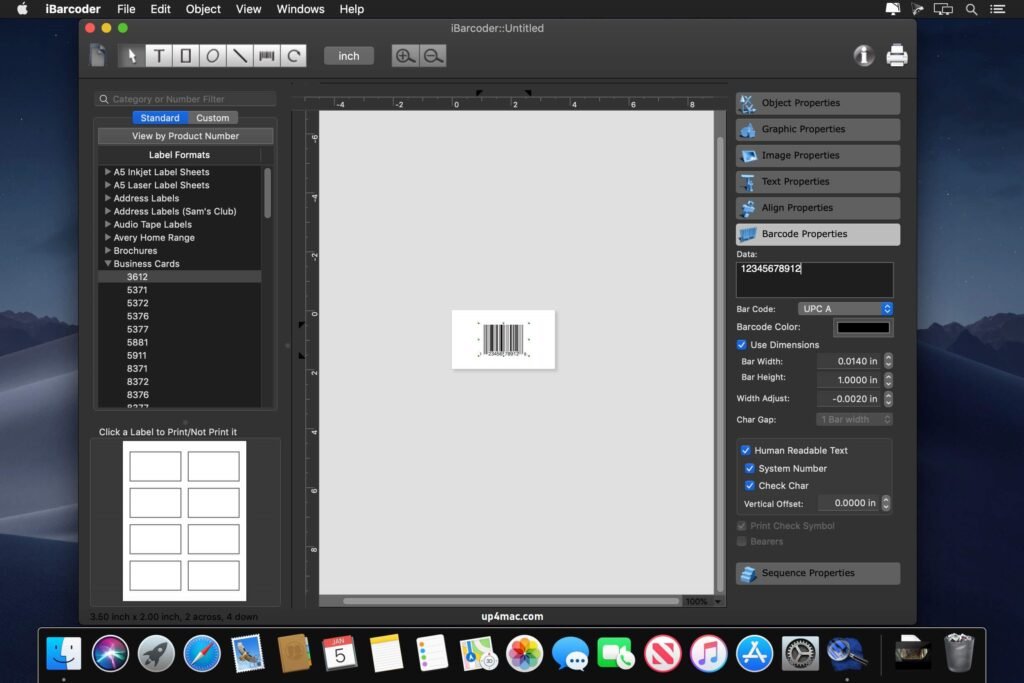
Cristallight iBarcoder for Mac is a professional barcode generator for Mac that lets you create any number of individual or sequential barcodes, print them as colorful labels in your own style, any size or shape, or export them as graphic image files in common vector and raster image formats.
iBarcoder makes designing and printing barcode labels, stickers, and tags on your Mac incredibly easy in just a few steps. Use our barcode software for Mac to produce barcodes in over 40 1D and 2D symbologies (Data Matrix, QR, etc.).
Key Features of iBarcoder 3.17.6 for MacOS
iBarcoder offers a comprehensive set of features designed to meet both simple and advanced barcode creation needs. Below are the most important features that make it a reliable barcode generator for Mac.
1. Wide Range of Supported Barcode Types
One of iBarcoder’s main advantages is its broad compatibility with barcode symbologies. It allows you to create:
- UPC-A and UPC-E
- EAN-8 and EAN-13
- Code 39
- Code 128
- ISBN
- ITF-14
- QR Code
- Data Matrix
- PDF417
- Postal Barcodes
This broad compatibility makes iBarcoder ideal for applications in the retail, publishing, logistics, healthcare, and industrial sectors.
2. Professional Barcode Label Design
- iBarcoder includes a built-in label design editor that allows for precise customization of barcode labels. Users can adjust the barcode size, text formatting, font styles, alignment, and position. It also allows for adding product names, descriptions, prices, and serial numbers to the labels.
As a result, businesses can design professional barcode labels tailored to their branding needs.
3. Batch Barcode Generation
- For businesses managing large inventories, batch barcode generation is essential. iBarcoder allows for the simultaneous generation of multiple barcodes by importing data from spreadsheets or CSV files. This feature significantly reduces manual work and increases productivity.
Consequently, businesses can efficiently create hundreds or even thousands of barcodes.
4. Sequential Numbering and Serialization
- The software supports automatic sequential numbering, making it ideal for inventory tracking and serial number management. Users can define starting numbers and increment values, ensuring consistent and accurate barcode generation.
5. High-Quality Printing and Export Options
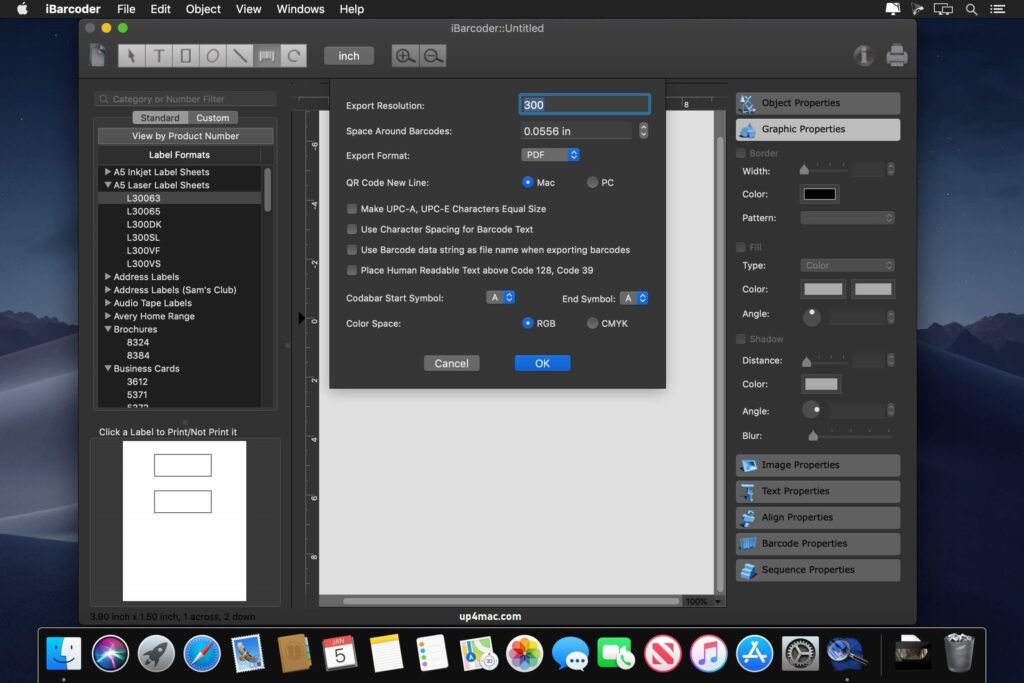
- iBarcoder supports high-resolution printing to ensure the clarity and accuracy of barcode scans. Users can print labels with standard printers or specialized label printers. Barcodes can also be exported in formats such as PDF, PNG, JPEG, TIFF, and EPS.
This flexibility allows businesses to integrate barcodes into packaging, marketing materials, and digital catalogs.
6. QR Code and 2D Barcode Support
- In addition to traditional 1D barcodes, iBarcoder supports modern 2D barcode formats such as QR codes and Data Matrix. These codes can store URLs, contact information, product details, and other digital content, making them valuable for marketing and product tracking.
7. Intuitive Interface
- Despite its advanced features, iBarcoder boasts a clear and intuitive interface. Its simple design ensures that even beginners can quickly create barcodes without any technical expertise.
8. macOS Optimization
- Designed specifically for macOS, iBarcoder delivers smooth performance and compatibility with Apple Silicon and Intel-based Macs. Its native macOS design guarantees stability and reliability.
you can also download: Dropshare 6.10.0 for MacOS
What’s New in iBarcoder 3.17.6 – Latest Updates
Version 3.17.6 introduces several improvements that optimize performance, compatibility, and usability.
1. Improved macOS Compatibility
- The latest version improves compatibility with recent macOS updates, ensuring stable performance on newer systems such as macOS Ventura and Sonoma.
2. Performance Optimization
- Backend improvements optimize processing speed when generating large batches of barcodes. Users will notice faster rendering and smoother label editing.
3. Enhanced QR Code Customization
- Version 3.17.6 includes improvements to QR code design options, allowing for greater flexibility in size and format.
4. Stability Improvements and Bug Fixes
- Minor bugs reported in previous versions have been fixed, improving application stability and reducing crashes.
5. Improved Export Accuracy
- Exported barcode files now maintain better resolution consistency, ensuring optimal scanning performance across different devices.
you can also download: Multitrack Editor 1.0.9 for MacOS
Screenshots:
System Requirements:
- Operating System: macOS 10.13 (High Sierra) or later
- Processor: Mac with Intel or Apple Silicon
- RAM: 2 GB minimum (4 GB recommended)
- Storage: 200 MB of free disk space
- Printer: Label-compatible printer
Conclusion
iBarcoder for macOS 3.17.6 is a professional and versatile barcode generator designed to meet the needs of businesses, retailers, publishers, and logistics professionals. With support for multiple barcode symbologies, batch generation, sequential numbering, and high-resolution export options, it offers a complete barcode creation solution for Mac users.
Homepage: https://up4mac.com/
Leave a Reply