
DockDoor 1.31.1 for MacOS Download

DockDoor 1.31.1 for MacOS is a lightweight yet powerful utility designed to extend the functionality of the macOS Dock. It allows you to preview windows in real time, perform quick actions, and improve app interaction directly from the Dock. Instead of switching between multiple windows or repeatedly using Mission Control, DockDoor lets users preview, manage, and navigate application windows more efficiently.
Aimed at both casual and professional macOS users, DockDoor improves multitasking, saves time, and streamlines workflow without disrupting the core macOS experience. In this detailed guide, we’ll explore DockDoor 1.31.1 in depth, covering its main features, latest updates, system requirements, advantages, disadvantages, and overall usability.
Key Features of DockDoor for macOS
DockDoor offers a wide range of features that enhance the standard macOS Dock while maintaining system stability and performance. Below are the most prominent features of DockDoor 1.31.1 for macOS.
Live Window Previews
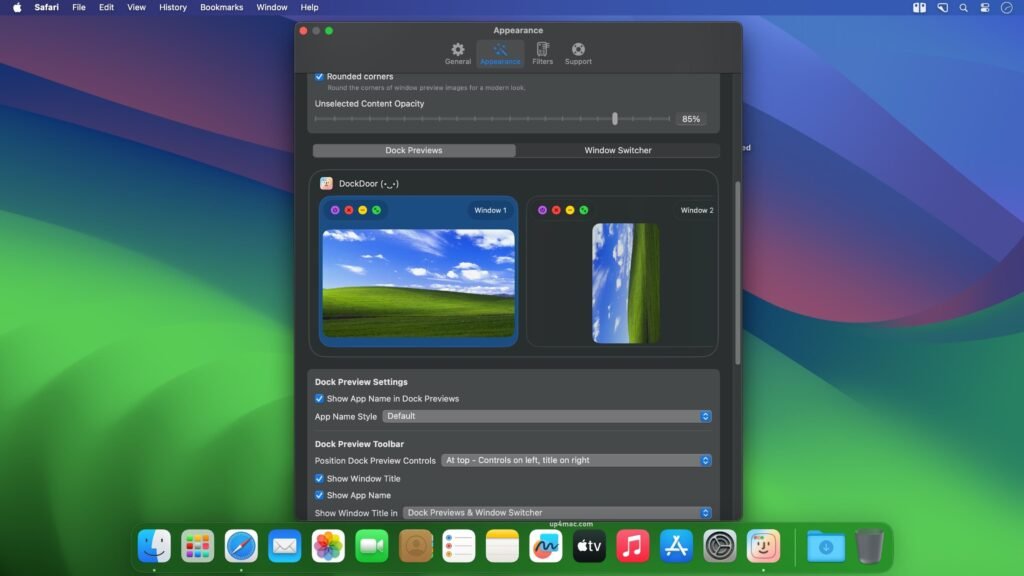
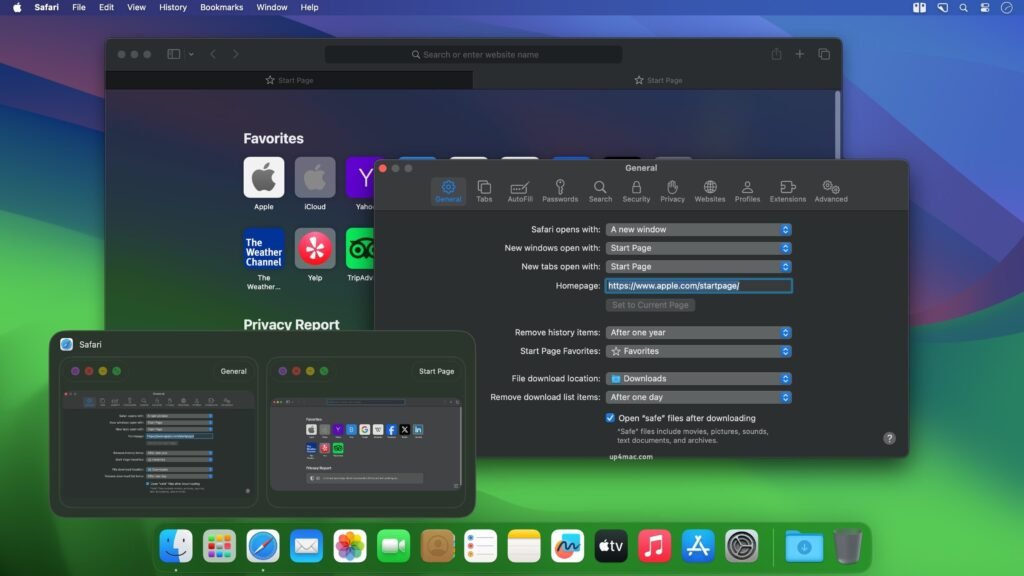
- One of DockDoor’s standout features is its ability to display live previews of application windows when you hover over Dock icons. Unlike static thumbnails, these previews update in real time, allowing users to see exactly what’s happening inside each window without opening it.
Fast Window Switching
- DockDoor makes switching between multiple windows of the same application faster and more intuitive. Instead of navigating between windows using keyboard shortcuts, users can visually select the desired window directly from the Dock preview.
Customizable Preview Layouts
- Users can customize the appearance of previews, including size, spacing, and animation behavior. This flexibility ensures that DockDoor adapts perfectly to different screen sizes and personal preferences.
Application-Specific Controls
- DockDoor offers contextual actions for supported applications. For example, users can close, minimize, or focus a window directly from the preview pane without opening the full application window.
Smooth Animations
- The software integrates seamlessly with macOS design principles, offering smooth animations that complement the system’s aesthetics. This ensures a natural user experience that feels native rather than intrusive.
Lightweight Performance
- Despite adding advanced features, DockDoor is optimized for low CPU and memory usage. It runs silently in the background without impacting system responsiveness.
Multi-macOS Compatibility
- DockDoor is compatible with a wide range of macOS versions, making it accessible to users with both older and newer Mac hardware.
What’s New in DockDoor 1.31.1
The DockDoor 1.31.1 update focuses on performance improvements, compatibility fixes, and minor feature enhancements to ensure stability on modern macOS versions.
Improved Stability
- This release includes bug fixes that address preview crashes and occasional Dock interaction issues reported in previous versions.
Better macOS Compatibility
- DockDoor 1.31.1 improves compatibility with recent macOS updates, ensuring smoother operation with the latest system platforms and security patches.
Improved Preview Rendering
- Window previews now render more smoothly, especially in apps with frequent visual updates, such as browsers, video players, and design tools.
Reduced Resource Usage
- Background processing has been optimized to reduce CPU usage, especially on MacBooks running on battery power.
Minor interface improvements
- Subtle interface improvements make previews clearer and more consistent with macOS visual standards.
You Can Also Download: ForkLift 4.4.5 for Mac
Screenshots:
System Requirements:
Before installing DockDoor 1.31.1, it’s important to ensure your Mac meets the necessary system requirements.
Minimum Requirements
- Operating System: macOS 10.13 (High Sierra) or later
- Processor: Mac with an Intel or Apple Silicon processor (via Rosetta if applicable)
- RAM: 4 GB minimum
- Storage: 50 MB of free disk space
- Display: Standard resolution supported by macOS
Recommended Requirements
- Operating System: macOS 11 (Big Sur) or later
- Processor: Apple Silicon or modern Intel processor
- RAM: 8 GB or more
- Storage: SSD with at least 100 MB of free space
- Display: Retina display for better preview quality
Advantages and Disadvantages of DockDoor for macOS
Like any productivity tool, DockDoor has its own advantages and disadvantages. Understanding them can help users decide if it fits their workflow.
Advantages
- Enhances Dock functionality without modifying system files
- Live window previews improve multitasking efficiency
- Lightweight and resource-efficient
- Easy to install and configure
- Customizable interface and behavior
- Works well with Macs running Intel and Apple Silicon
Disadvantages
- Advanced customization options may require some initial learning
- Some third-party applications may not be fully compatible with live previews
- Relies on accessibility permissions, which some users may prefer to avoid
Conclusion:
DockDoor 1.31.1 for macOS is an excellent productivity tool that transforms how users interact with the macOS Dock. By incorporating live window previews, quick access controls, and smooth animations, DockDoor bridges the gap between simplicity and efficiency.
Homepage: https://up4mac.com/
Leave a Reply