
EdgeView 5.8.5 For MacOS Download

EdgeView 5.8.5 for macOS is a modern image viewer and file explorer designed specifically for macOS. It offers fast rendering, a sleek user interface, compressed file support, comic playback tools, and broad image format support.
Developed by DJ.HAN, EdgeView focuses on:
- Ultra-fast image browsing
- RAW image support
- Viewing compressed files without extraction
- Playing comics and manga
- Playing animations
- Browsing files over the network
- Modern macOS integration
Unlike traditional image viewers that only offer basic viewing features, EdgeView provides a highly optimized experience, ideal for users working with large image libraries and compressed files. Whether you’re a professional photographer, comic book enthusiast, illustrator, graphic designer, or simply a regular Mac user, EdgeView 5.8.5 offers a smooth and feature-rich image management experience.
Key Features of EdgeView 5.8.5
Fast and Optimized Image Rendering
One of EdgeView’s main strengths is its extremely fast image rendering engine.
According to the official website, EdgeView has been rewritten in Swift to improve performance and responsiveness.
The application is optimized for:
- High-resolution image rendering
- Managing large image collections
- Smooth navigation
- Fast thumbnail generation
Users can quickly browse their image libraries with no noticeable latency.
Extensive Image Format Compatibility
EdgeView supports a wide range of image formats.
Supported Formats:
- JPG
- PNG
- GIF
- BMP
- TIFF
- PSD
- WEBP
This broad compatibility makes the software ideal for photographers, graphic designers, and digital artists.
RAW Image Support
RAW file support improves workflow efficiency for:
- Photographers
- Photo Retouchers
- Content Creators
- Graphic Designers
One of EdgeView’s most impressive features is its ability to directly browse compressed files.
According to the official feature list, the software supports:
- ZIP
- RAR
- CBZ
- CBR
Users can open and explore images within compressed files without needing to manually extract them.
This feature is especially useful for comic and manga readers.
Powerful tools for reading comics and manga
EdgeView includes features specifically designed for reading comics, such as:
- Double-page view
- Continuous scrolling
- Right-to-left reading
- Panel navigation
- Smooth scrolling
These features explain EdgeView’s immense popularity among comic and manga readers on macOS.
Animation Playback
The software supports playback of animated files, including:
- GIF
- Animated PNG
- Animated WebP
- Users can:
- Control playback
Animation playback is smooth and fast, even with large files.
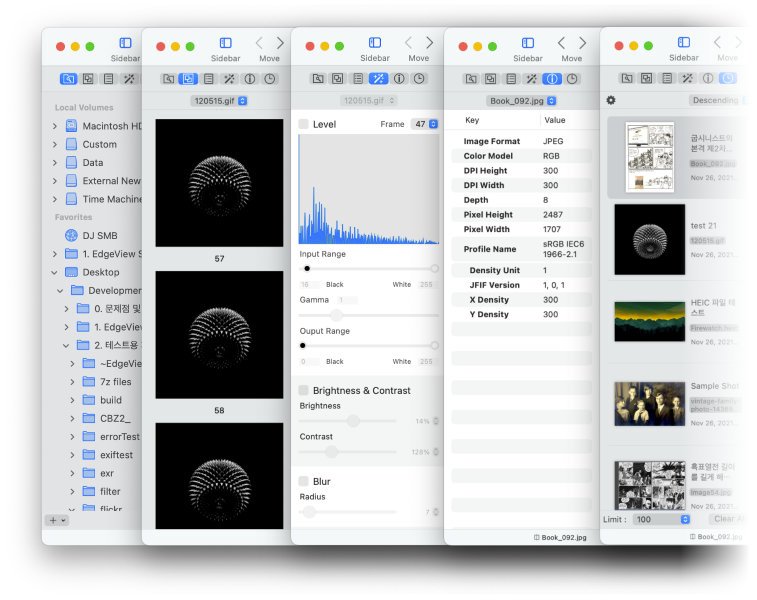
Built-in File Browser
EdgeView includes a file browser that allows users to:
- Browse local folders
- Quickly preview files
- Browse compressed files
- Access network storage
- Browse image collections
This eliminates the need to constantly switch between the Finder and the viewer.
Network Drive and FTP Support
EdgeView can access:
- SMB Shares
- AFP Network Drives
- FTP Servers
- Shared Workstations
- NAS Storage
- Remote File Libraries
What’s New in EdgeView 5.8.5
Improved Performance for AFP and SMB
Recent updates in version 5.8 improve playback performance on:
- AFP-mounted drives
- SMB network drives
This results in smoother navigation when using NAS devices or shared servers.
User Interface Bug Fixes
Version 5.8.x fixes:
- User interface bugs
- Continuous scrolling issues
- Thumbnail display problems
These improvements optimize stability and the user experience.
Improved Animation Playback Stability
Recent updates fix:
- WebP animation crashes
- Image playback errors
- Initial scroll positioning issues
This improves compatibility with animated media files.
Enhanced High-Quality Rendering
Recent versions add options for:
- Faster rendering of high-quality images
- Reduced rendering times
- Improved caching systems
These optimizations improve responsiveness when browsing images.
Improved Toolbar and File Explorer Usability
Recent versions improve:
- Toolbar design
- Switching between icon and list view
- File Explorer commands
- Preview panel stability
These improvements streamline workflows for everyday browsing.
You can also Download: CotEditor 7.0.3 For MacOS
Screenshots:
System Requirements:
Minimum System Requirements
To use EdgeView 5.8.5 optimally on macOS, the minimum system requirements are as follows:
- Operating System: macOS 11.5 Big Sur or later
- Processor: Intel Mac or Apple Silicon (M1/M2/M3 compatible)
- RAM: 4 GB minimum
- Storage: Approximately 150 MB of available disk space
The official website confirms compatibility with Intel and Apple Silicon systems.
System Requirements
For optimal image viewing and RAW file management, the following configuration is recommended:
- Operating System: macOS Ventura, Sonoma, or later
- Processor: An Apple Silicon M-series processor is recommended
- RAM: 8 GB or more
- Storage: An SSD is recommended
- Display: Retina or high-resolution display
Meeting the recommended specifications improves responsiveness with large image collections and high-resolution files.
Advantages and Disadvantages of EdgeView 5.8.5:
Advantages:
- Extremely Fast Performance
- Excellent Compatibility with Compressed Files
- Wide File Format Compatibility
- Ideal for reading comics
- Lightweight and optimized
- High-quality rendering
- Integrated file explorer
- Significantly improves workflow efficiency.
Disadvantages:
- Limited editing features
- Primarily focused on viewing, not editing.
- The interface can be complex for beginners.
- Exploring advanced features can be time-consuming.
- No Windows version
- Available only for macOS.
Conclusion:
EdgeView 5.8.5 for macOS is a powerful, fast, and highly optimized image viewer designed for demanding users seeking greater flexibility and performance than the macOS Preview application. With its broad image format support, file browsing without extraction, RAW support, comic book reading tools, network drive access, animation playback, and optimization for Apple Silicon processors, EdgeView stands out as one of the best lightweight image viewers available for Mac users.
Leave a Reply