
Pixelmator Pro 4.0 for MacOS Download

Pixelmator Pro 4 for macOS stands out as a modern, high-performance image editing application designed exclusively for Mac users.
Pixelmator Pro combines advanced photo editing, graphic design, and illustration tools in a single, elegant interface. Designed to take full advantage of macOS technologies, it delivers impressive speed, smooth performance, and seamless integration with Apple hardware. Version 4.0 further refines the experience with enhanced tools, increased performance, and greater compatibility with the latest macOS versions.
This article explores Pixelmator Pro 4 in detail. We’ll cover its main features, the latest updates, system requirements, advantages, disadvantages, and overall usability. Whether you’re a beginner looking for an intuitive editor or a professional seeking a powerful alternative to traditional software, this guide will help you understand why Pixelmator Pro is one of the best image editing solutions for macOS.
Key Features of Pixelmator Pro 4 for macOS
Pixelmator Pro 4.0 offers a comprehensive suite of tools designed to handle all kinds of tasks, from basic photo retouching to advanced graphic design. Below are the key features that make it the best choice for Mac users.
Powerful Photo Editing Tools
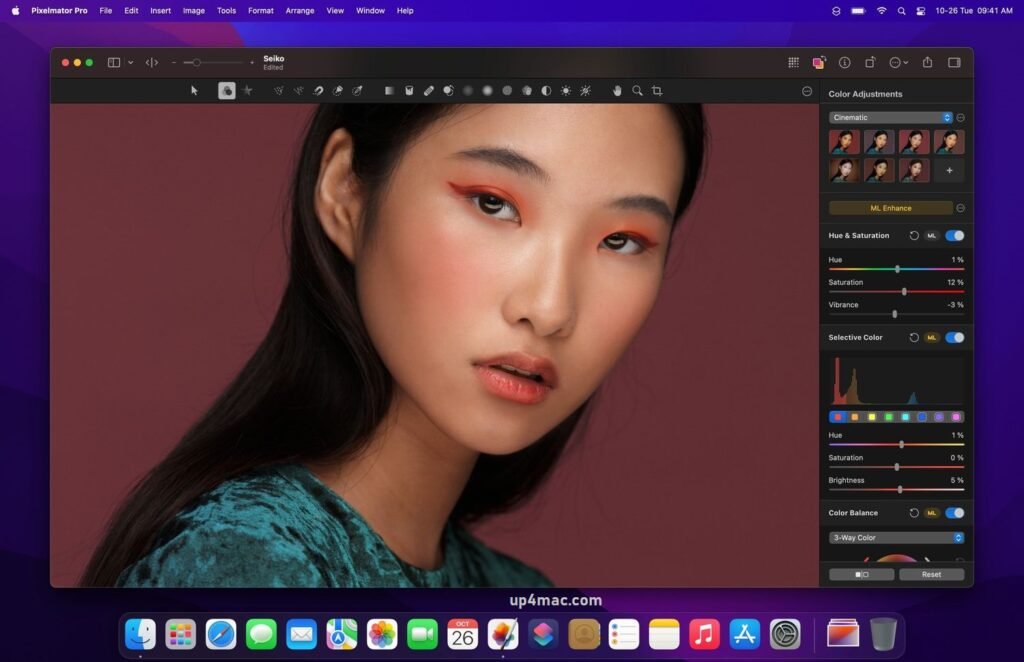
- Pixelmator Pro offers a complete set of photo editing tools, including color correction, exposure adjustments, white balance control, and advanced retouching options. Users can precisely adjust images while maintaining natural results. Non-destructive editing ensures that the original images remain intact throughout the workflow.
Advanced Selection and Masking
- Precise selection is essential for professional editing, and Pixelmator Pro excels in this area. The software includes intelligent selection tools that allow you to easily isolate specific objects, backgrounds, or areas. Combined with layer masks, these tools enable faster and more precise execution of complex edits.
Layered Editing System
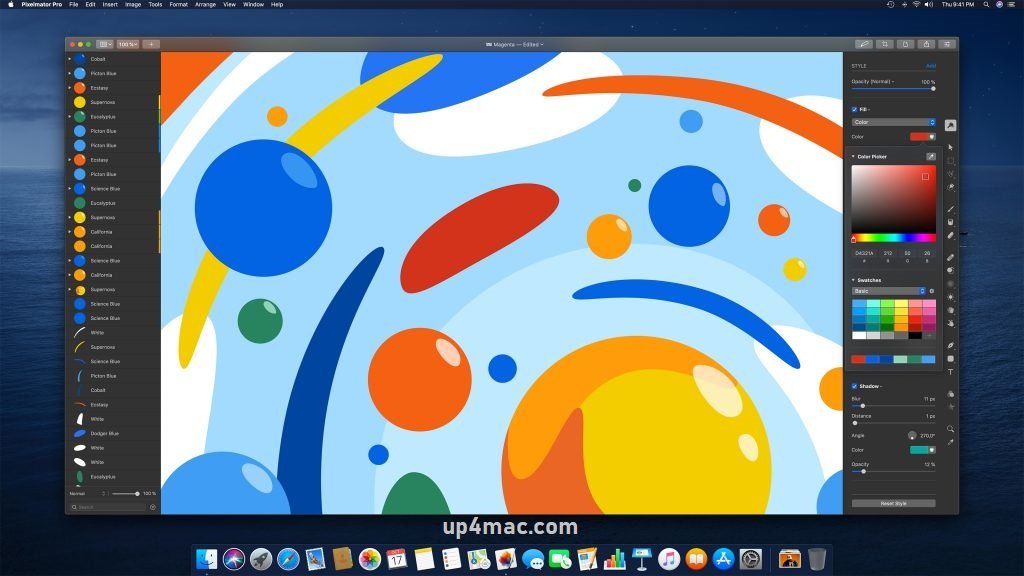
- Pixelmator Pro’s layered workflow allows users to work efficiently on complex projects. Layers of text, images, shapes, and adjustments can be seamlessly combined. This flexibility is especially useful for graphic designers and digital artists working on compositions with multiple elements.
Vector and Graphic Design Tools
- In addition to photo editing, Pixelmator Pro includes powerful vector design features. Users can create scalable graphics, icons, and illustrations using shape tools and vector paths. This makes it ideal for user interface (UI) design, branding, and marketing materials.
Machine Learning-Based Enhancements
- Pixelmator Pro leverages advanced macOS technologies to deliver intelligent image enhancements. Features such as automatic color adjustments, object detection, and image scaling help users achieve professional results with minimal effort, saving time without compromising quality.
Seamless macOS Integration
- Designed exclusively for macOS, Pixelmator Pro integrates seamlessly with system features like iCloud, Metal acceleration, and native file management. It supports the most popular image formats and works seamlessly with other Apple applications, enhancing productivity across the entire Mac ecosystem.
you can also download: PhotoMarks 4.1 for MacOS
What’s New in Pixelmator Pro for macOS 4.0
Pixelmator Pro 4.0 introduces significant updates that improve usability, performance, and creative possibilities. These enhancements reflect the evolving needs of modern creators.
Improved Performance and Stability
- One of the most notable improvements in version 4.0 is the enhanced performance. The application runs faster and more efficiently, especially on newer Mac hardware. Large files, high-resolution images, and complex layer structures are handled more smoothly than before.
Enhanced Editing Tools
- Pixelmator Pro 4.0 refines several existing tools, offering greater precision and control. Adjustments are more streamlined, and workflows are optimized to reduce unnecessary steps. These improvements benefit both beginner and advanced users.
Improved Compatibility with the Latest macOS Versions
- The latest version is optimized for the most recent macOS versions, ensuring greater stability and fewer compatibility issues. This allows users to take advantage of system-level improvements without sacrificing reliability.
Workflow and Interface Improvements
- Maintaining its clean and modern design, Pixelmator Pro 4.0 introduces subtle interface improvements that enhance navigation and usability. Access to tools is more intuitive, and the workspace organization allows users to focus on creativity rather than technical complexity.
you can also download: OmniReader Pro 3.4.1 for MacOS
Screenshots:
System Requirements for Pixelmator Pro on macOS 4.0
To ensure smooth operation, it is important to verify that your Mac meets the system requirements for Pixelmator Pro 4.0.
Minimum System Requirements
- Operating System: Compatible with macOS and Pixelmator Pro 4.0
- Processor: Intel for Mac or Apple Silicon processor
- RAM: Minimum 4 GB
- Storage: At least 1 GB of available disk space
- Graphics: Metal-compatible graphics hardware
These minimum requirements allow the software to function, but performance may be limited when working with large images or advanced features.
Recommended System Requirements
- Operating System: Latest supported version of macOS
- Processor: Apple Silicon (M1, M2, or later) or high-performance Intel processor
- RAM: 8 GB or more
- Storage: SSD with sufficient free space
- Graphics: Metal-optimized GPU for accelerated performance
you can also download: Apple Compressor 4.11.1 for MacOS
Pros and Cons of Pixelmator Pro for macOS 4.0
Understanding the strengths and limitations of Pixelmator Pro helps users determine if it is the right tool for their needs.
Pros
- Intuitive and modern user interface
- Powerful photo editing and graphic design tools
- Optimized for macOS and Apple hardware
- Excellent performance on Apple Silicon Macs
- One-time purchase model with no subscription
- Suitable for both beginners and professionals
Cons
- Available only for macOS users
- Fewer advanced features compared to some industry-standard software
- Limited third-party plugin support
Conclusion:
Pixelmator Pro 4.0 for macOS is a versatile and powerful image editing application that strikes an excellent balance between ease of use and professional capability. Its fast performance, elegant interface, and deep integration with macOS make it an attractive choice for a wide range of users, from casual editors to experienced designers.
Homepage: https://up4mac.com/
Leave a Reply