
RAR Extractor 15.4 For MacOS Download

RAR Extractor 15.4 for macOS is a lightweight and intuitive file management tool designed to quickly and easily open, extract, preview, and organize compressed files. This software prioritizes simplicity, fast extraction, broad file format support, and seamless integration with macOS.
The application supports:
- RAR file extraction
- ZIP and 7z files
- Password-protected files
- Multipart files
- Batch extraction
Unlike complex and cumbersome file management programs, RAR Extractor offers a streamlined experience for users who simply want fast and reliable decompression tools on macOS.Although macOS natively supports ZIP file extraction, it doesn’t natively support RAR files or several other advanced compression formats. Therefore, many Mac users rely on third-party software to extract and efficiently manage compressed files.
Whether you’re a student, office worker, photographer, software enthusiast, or casual Mac user, RAR Extractor 15.4 is an efficient solution for managing your compressed files.
Key Features of RAR Extractor 15.4 For MacOS:
Wide File Format Compatibility
One of the main advantages of RAR Extractor is its broad compatibility with compressed file formats.
Supported Formats:
- RAR
- ZIP
- 7z
- TAR
- GZIP
This broad compatibility allows users to manage files downloaded from various platforms without needing multiple extraction applications.
This software is especially useful for users who frequently work with different types of files.
Fast RAR File Extraction
RAR Extractor is specifically optimized for the efficient handling of RAR files.
The software offers:
- Fast decompression
- Fast file analysis
- Stable extraction performance
- Smooth handling of large files
The extraction engine is lightweight and responsive, enabling smooth decompression workflows, even on older Mac systems.
Password-Protected File Support
The application fully supports encrypted and password-protected files.
Users can:
- Open secure RAR files
- Extract password-protected ZIP files
- Access encrypted 7z files
The software automatically prompts the user for the password during extraction.
Multi-Part File Extraction
RAR Extractor supports split and segmented file formats.
Supported multi-part structures include:
- .part1.rar
- .r00
- .001 (split files)
This feature is extremely useful for managing large files distributed across multiple parts.
Batch Extraction Support
The software includes a batch extraction feature to increase productivity.
Users can:
- Extract multiple files simultaneously
- Process large collections of compressed files
- Automate repetitive extraction tasks
File Preview
RAR Extractor allows users to preview the contents of files before extraction.
Preview features include:
- File list
- Folder structure
- Selective extraction
- File navigation
This feature helps users avoid extracting unnecessary files and improves workflow efficiency.
What’s New in RAR Extractor 15.4
Improved Compatibility with Apple Silicon Processors
Version 15.4 offers improved optimization for:
- Apple M1 Processors
- Apple M2 Processors
- Apple M3 Systems
Apple Silicon Processor Users will experience smoother overall performance.
Improved macOS Compatibility
Recent updates improve compatibility with:
- macOS Ventura
- macOS Sonoma
- Modern Finder Integrations
This ensures smoother operation on current versions of macOS.
Improved Handling of Password-Protected Compressed Files
Version 15.4 improves:
- Password prompt reliability
- Compatibility with encrypted files
- Multi-step password extraction workflows
These updates improve compatibility with secure compressed files.
Improved Performance with Large Files
Recent Optimizations:
- Memory Management
- File Loading Speed
- Increased Stability When Extracting Large Files
Users working with large compressed collections will benefit from smoother performance.
Stability and Bug Fixes
The latest version also includes:
- Fewer Crashes
- Increased Extraction Reliability
- Improved File Analysis
- Interface Enhancements
These updates improve the overall user experience.
You can also Download: EdgeView 5.8.5 For MacOS
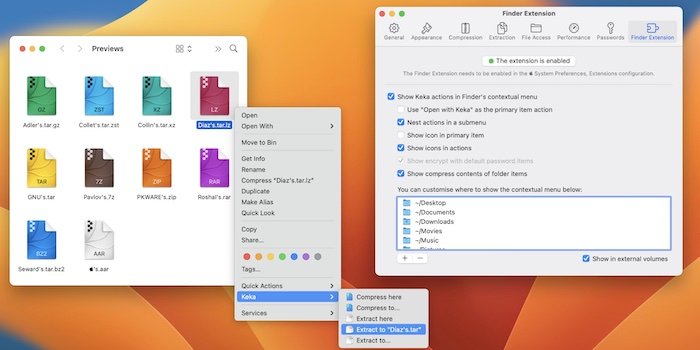
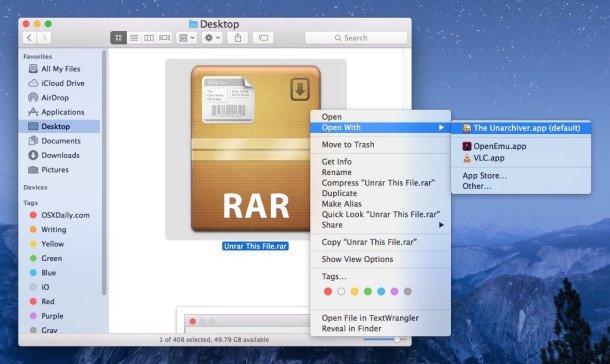
Screensots:
System Requirements
Minimum System Requirements
To use RAR Extractor 15.4 effectively on macOS, the minimum system requirements are as follows:
- Operating System: macOS 10.13 High Sierra or later
- Processor: Intel Mac or Apple Silicon Mac
- RAM: 4 GB minimum
- Disk Space: Approximately 100 MB of free space
Recommended Configuration
For smoother extraction and improved responsiveness, the following configuration is recommended:
- Operating System: macOS Ventura or later
- Processor: An Apple Silicon M-series processor is recommended
- RAM: 8 GB or more
- Disk Space: An SSD is recommended for faster extractions
- Display: A Retina display is recommended
Meeting the recommended specifications improves performance when extracting large files.
Advantages and Disadvantages of RAR Extractor 15.4
Advantages:
- Excellent RAR Compatibility
- Extracts RAR files quickly and reliably.
- Wide File Compatibility
- Compatible with ZIP, 7z, TAR, ISO, and other formats.
- Lightweight and Fast
- Minimal System Resource Consumption.
- Intuitive Interface for Beginners
- Its simple design makes it easy to use.
- Password-Protected File Support
Disadvantages:
- Limited Archive Creation Features
- Primarily focused on extraction, not compression.
- Limited Advanced Tools
- Lacks some professional file management features.
- Limited customization options
- Basic interface customization.
- macOS only
- No Windows version available.
Conclusion:
RAR Extractor 15.4 for macOS is a lightweight and reliable file extraction utility designed to help Mac users manage their compressed files quickly and efficiently. Compatible with RAR, ZIP, 7z, and TAR formats, as well as password-protected archives, multi-part extraction, batch processing, and optimized for Apple Silicon processors, this software offers a practical solution for everyday file management.
Leave a Reply