
lwouis AltTab 11.0.0 For MacOS Download

AltTab 11.0.0 for macOS is a popular open-source window manager designed to provide advanced Alt+Tab-style window management on Mac systems. The application offers a customizable and efficient window-switching interface, similar to that of Windows, and integrates seamlessly with macOS workflows.
AltTab focuses on:
- Window switching
- Improved productivity
- Keyboard navigation
- Multi-monitor support
Unlike macOS’s default application switching system, AltTab allows you to switch directly between windows with real-time previews, search filters, advanced customization, and workflow automation. Whether you’re a developer, designer, office professional, content creator, or multitasker, AltTab 11.0.0 offers one of the best productivity enhancements available for macOS.
Key Features of AltTab 11.0.0:
True Window Switching
AltTab’s primary goal is to enable true window switching, not just application switching.
Unlike macOS’s default shortcut system, AltTab allows users to:
- Switch between individual windows
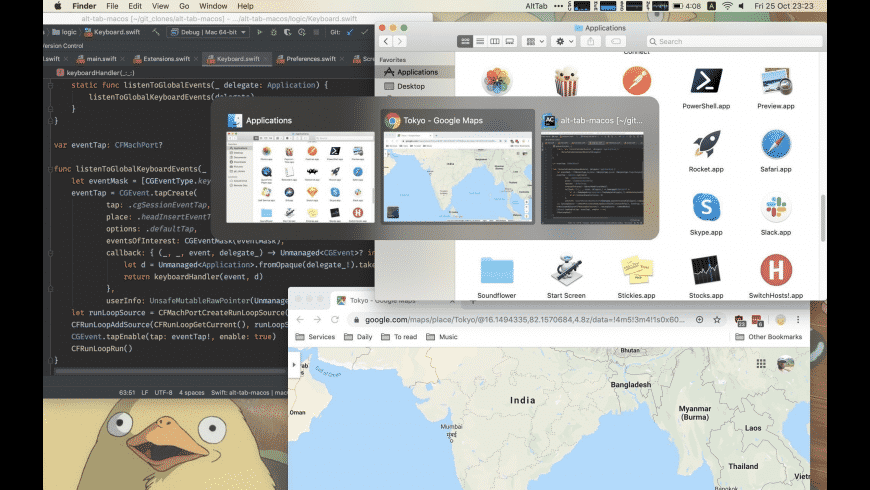
- Preview open windows
- Quickly navigate using the keyboard
- Select minimized windows
- Switch between multiple displays
This enables a much more efficient multitasking workflow, especially for users who work with many windows open simultaneously.
Real-Time Window Preview
AltTab displays a real-time preview of active windows.
These previews help users:
- Quickly identify windows
- Avoid selecting the wrong application
- Visually navigate between tasks
- Improve workflow efficiency
Preview thumbnails update dynamically and offer a more intuitive multitasking experience than the default macOS app switcher.
Highly customizable interface
AltTab offers numerous customization options.
Users can configure:
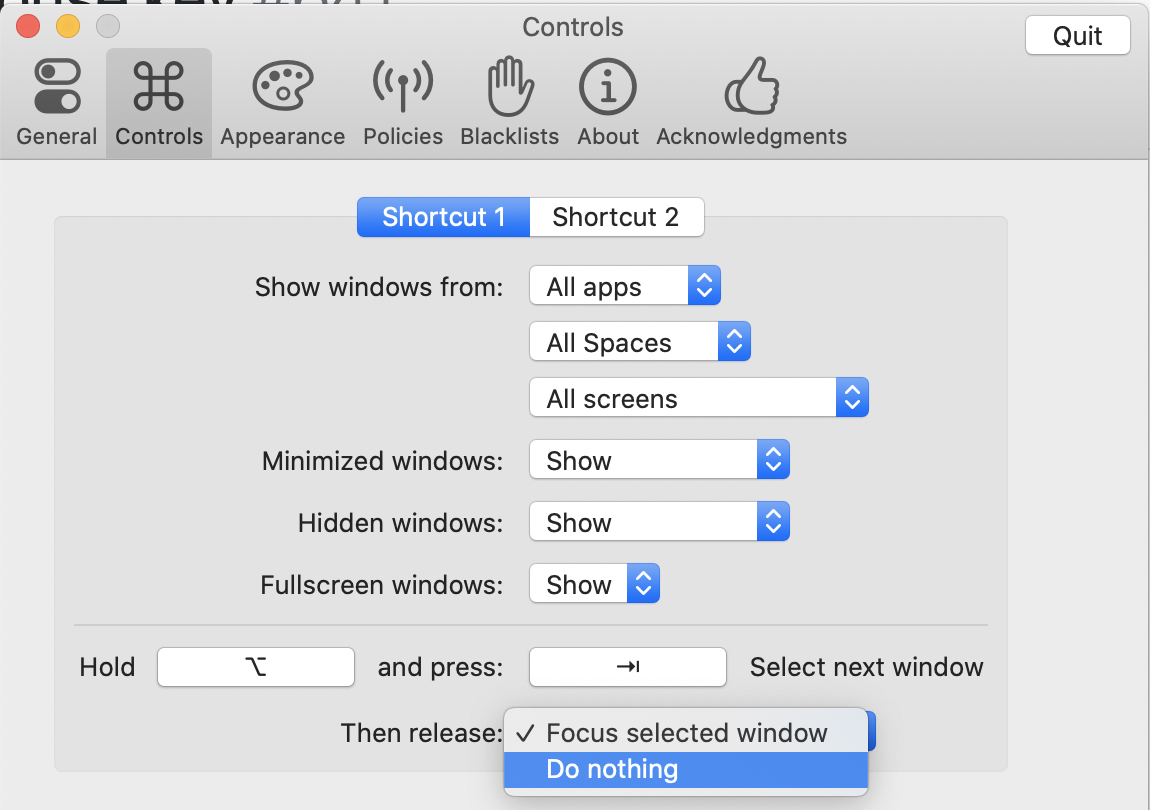
- Keyboard shortcuts
- Window appearance
- Preview size
- Theme styles
- Display position
- Animation behavior
- Thumbnail design
The software allows users to adapt the interface to their productivity preferences.
Search functionality
AltTab includes search tools to quickly locate windows.
Users can:
- Filter windows by title
- Instantly search for applications
- Manage complex workflows more efficiently
This is especially useful for developers and professionals who manage dozens of active windows simultaneously.
Keyboard-based productivity
AltTab is designed for keyboard-based workflows.
Users can:
- Navigate entirely without a mouse
- Customize keyboard shortcuts
- Quickly switch between windows
- Improve multitasking speed
Keyboard-centric workflows help reduce interruptions and significantly improve productivity.
Support for minimized and hidden windows
Unlike the default macOS window switcher, AltTab can display:
- Minimized windows
- Hidden windows
- The full list of windows
This improves accessibility and makes it easier to locate inactive windows.
Blacklisting and filtering features
AltTab allows users to exclude certain applications or windows from the window switching interface.
Users can:
Ignore background applications
- Hide utility windows
- Exclude floating panels
- Customize filtering rules
This keeps the interface clean and intuitive.
What’s New in AltTab 11.0.0?
Improved macOS Compatibility
Version 11.0.0 offers improved compatibility with recent macOS versions.
The latest updates include:
- Greater stability
- Improved system integration
- Enhanced security support
- Improved support for Apple Silicon processors
These changes allow AltTab to work more reliably on modern Mac systems.
Performance Optimizations
The latest versions have improved:
- Window previews
- Smooth animations
- CPU efficiency
- Memory management
These optimizations improve responsiveness during intensive multitasking sessions.
Improved Multi-Monitor Support
Version 11.0.0 improves:
- Monitor switching behavior
- Window positioning
- Custom previews for each monitor
- Support for external monitors
These updates improve the productivity of advanced desktop setups.
Improved Search and Filtering
Recent improvements include:
- Faster window search
- Improved filtering logic
- Optimized application exclusion management
- More precise preview organization
These improvements allow users to manage a large number of windows more efficiently.
User Interface Improvements
AltTab 11.0.0 also includes improvements to:
- Theme consistency
- Thumbnail resizing
- Window highlighting behavior
- Keyboard navigation responsiveness
These changes improve overall usability.
Stability and Bug Fixes
This latest version includes:
Fixes for bugs that caused unexpected crashes
- Improved accessibility support
- Improved startup reliability
- Improved window detection
- Fixes for macOS-specific bugs
These updates significantly improve long-term stability.
Screenshots:
System Requirements:
Minimum System Requirements
To use AltTab 11.0.0 optimally on macOS, the minimum system requirements are as follows:
- Operating System: macOS 10.14 Mojave or later
- Processor: 64-bit Intel or Apple Silicon processor
- RAM: 4 GB minimum
- Storage: Approximately 100 MB of available disk space
- Additional Configuration: Accessibility permissions enabled
Recommended Configuration
For optimal multitasking and smoother window previews, the following configuration is recommended:
- Operating System: macOS Ventura, Sonoma, or later
- Processor: Apple M1, M2, M3, or later
- RAM: 8 GB or more
- Storage: SSD recommended
- Display: Retina display or multi-monitor setup
Following the recommended configuration improves preview responsiveness and multi-window management.
Advantages and Disadvantages of AltTab 11.0.0:
Advantages
True window switching
- Much more efficient than the default macOS application switcher.
Excellent keyboard productivity
- Fast navigation improves multitasking.
Real-time window previews
- Makes window identification easier.
Lightweight and fast
- Minimal system resource consumption.
Open source development
- Frequent updates provided by the community.
Multi-monitor support
- Ideal for advanced workstation setups.
Highly customizable
- Flexible interface and shortcut configuration.
Disadvantages
Accessibility permissions required
- Initial setup may be confusing for some users.
Learning curve for advanced settings
- Customization options may seem complex at first.
macOS security restrictions
- System updates sometimes require reconfiguration.
Rare issues with preview display
- Some users report occasional problems with thumbnail updates.
Conclusion:
AltTab 11.0.0 for macOS is a powerful and sophisticated window management utility designed to optimize multitasking and productivity through window-based navigation. With its real-time previews, keyboard-controlled workflows, advanced customization options, multi-monitor support, search functionality, and lightweight design, AltTab offers a superior alternative to macOS’s default application switcher.
Leave a Reply