
Infuse Pro 8.4.6 For MacOS Download

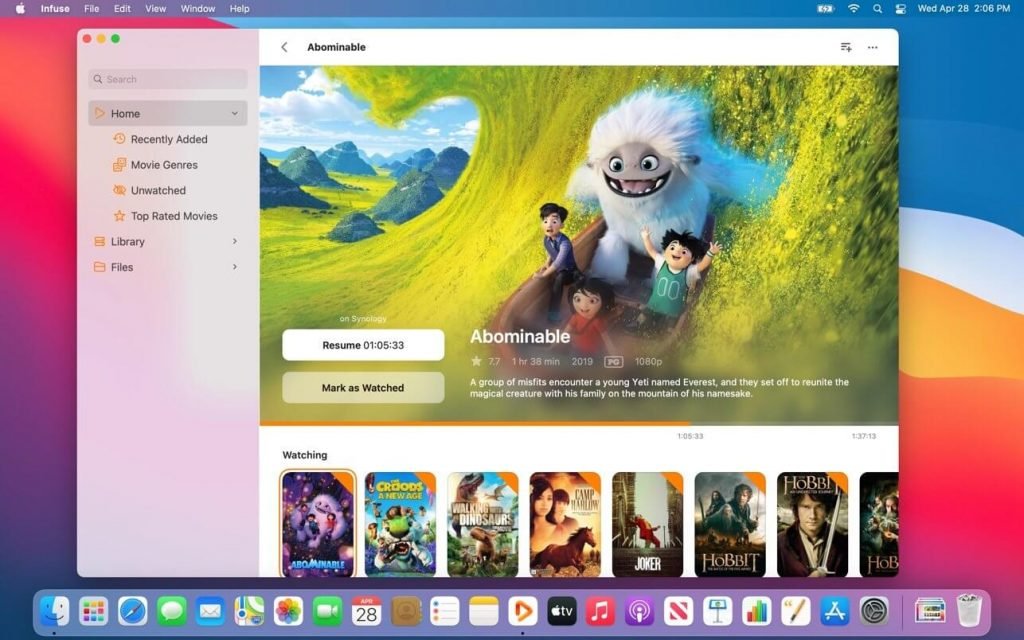
Infuse Pro 8.4.6 for macOS is a premium media player developed by Firecore, designed to deliver a seamless playback experience across the entire Apple ecosystem. Unlike many traditional players, Infuse can play virtually any video format without transcoding, automatically organizing media libraries with cover art, metadata, ratings, cast information, and trailers. It supports local files, NAS devices, Plex, Emby, Jellyfin, cloud services, and network shares from a unified interface.
Version 8.4.6 continues the rapid development of the Infuse 8.x generation with new media server improvements, optimized playback controls, customization options, and stability fixes.
Key features of Infuse Pro 8.4.6:
Playback of virtually all video formats
One of Infuse’s strengths is its broad compatibility with codecs and containers.
Supported formats:
- MKV
- MP4
- AVI
- MOV
- ISO
- BDMV
- H.264
- AV1
Most formats are played directly, without conversion or transcoding.
Automatic and elegant library organization
Infuse automatically downloads:
- Movie posters
- Episode information
- Cast information
- Ratings
- Descriptions
- Metadata
Transforms folders into a streaming-optimized media library.
Integration with Plex, Emby, and Jellyfin
The software integrates directly with:
- Plex
- Emby
- Jellyfin
Users can access their libraries without server-side transcoding, preserving viewing history and metadata synchronization.
NAS and Network Streaming
Infuse supports direct streaming from:
- SMB Shares
- NFS Shares
- FTP Servers
- WebDAV
- Network Drives
- NAS Devices
This flexibility makes it the ideal solution for users with large media collections.
Dolby Vision and HDR Support
Infuse Pro includes advanced video features such as:
- Dolby Vision
- HDR10
- HDR10+
- HLG
- 4K UHD Playback
These features optimize image quality on compatible Apple devices.
High-Definition Audio Compatibility
Audio compatibility:
- Dolby Atmos (E-AC3)
- DTS
- DTS-HD
- FLAC
- AAC
- AC3
- Lossless Audio Formats
Infuse thus appeals to home theater systems and audiophiles.
Advanced Subtitle Support
Infuse supports a wide range of subtitle formats, including:
- SRT
- ASS/SSA
- VTT
- PGS
- VobSub
- DVB Subtitles
It also allows one-click subtitle downloads via integrated services.
Cloud Storage Integration
Users can play content directly from:
- Google Drive
- Dropbox
- OneDrive
- Box
Other compatible cloud storage providers
No prior file download is required.
iCloud Sync
Infuse Pro can sync:
- Library settings
- Playback progress
- Playback history
- Favorites
- Connections
Across multiple Apple devices via iCloud.
Optimized for the Apple ecosystem
Infuse is designed specifically for:
- macOS
- iPhone
- iPad
- Apple TV
- Vision Pro
This approach allows for deep optimization across all platforms and an optimal user experience on all Apple devices.
What’s New in Version 8.4.6?
Secondary Addresses for Emby and Jellyfin
Version 8.4.6 introduces support for secondary server addresses when using Emby and Jellyfin, improving connectivity in various network environments.
Custom Images for the Library and Server
Users can now apply custom images to the following:
- Library icons
- Media server icons
- Providing additional customization options.
- Playback Position API Improvements
This update adds support for sending and receiving playback positions via the Firecore x-callback-url API.
New Volume Button for macOS
A new mute/unmute button has been added directly to the macOS playback overlay for faster audio control.
Improved Language and Dialect Handling
Language recognition and dialect handling have been improved for metadata and playback workflows.
Stability Improvements
Version 8.4.6 fixes the following issues:
- Playback crashes
- Audio issues related to variable playback speed
- Missing configuration options
- Album cover display issues
Screenshots:

System Requirements:
Minimum System Requirements
- Operating System: macOS 15 Sequoia or later (current version)
- Processor: Intel Mac, Apple Silicon (M1, M2, M3, M4)
- RAM: 4 GB minimum
- Storage: Approximately 150 MB of free space
Current versions are compatible with modern Apple platforms.
Recommended System Requirements
- Processor: Apple Silicon (M series)
- RAM: 8 GB or more
- Storage: SSD recommended
- Network: Gigabit Ethernet or fast Wi-Fi for large 4K media libraries
These specifications provide an optimal experience for playing high-bitrate 4K HDR video.
Advantages and Disadvantages:
Advantages:
- Plays virtually all major video formats without conversion.
- One of the most attractive media library systems available on macOS.
- Deep integration with Plex, Emby, and Jellyfin
- Enables direct playback and reduces the need for transcoding.
- Dolby Vision and HDR support
- Optimized for Apple devices
- Designed specifically for the Apple ecosystem.
Disadvantages:
- Premium features required for the Pro version
- Occasional bugs related to updates
- Limited use outside the Apple ecosystem
- No Windows version available.
- Rescanning large libraries can be time-consuming
Conclusion:
Infuse Pro 8.4.6 for macOS remains one of the best media playback applications available for Apple users. Its ability to play virtually all video formats, integrate with Plex, Emby, Jellyfin, NAS devices, and cloud services, and offer premium features such as Dolby Vision, HDR, and Atmos support, as well as automatic metadata organization, make it an exceptional choice for multimedia enthusiasts.
Leave a Reply